How to Create an AI Video Ad from a Product Catalog

An AI video ad from a product catalog gives ecommerce brands a faster way to turn existing product images into engaging advertising content. Creating video advertisements for an ecommerce catalog can become difficult very quickly. A brand may have hundreds or thousands of products, but creating a separate video ad for every product can require photography, video production, scripting, editing, voiceovers, motion graphics, and multiple rounds of review.
This creates a major production bottleneck, especially when businesses already have high-quality product catalog images but do not have enough video content to support their advertising strategy.
AI video creation offers a different approach. Instead of starting every advertisement with a new photoshoot or video shoot, businesses can use their existing product catalog images as the starting point and transform them into short-form video advertisements.
This makes it possible to turn static product information into dynamic marketing content for social media, paid advertising, product launches, promotions, and ecommerce campaigns.
LovPics, for example, provides AI product video and AI Reels workflows designed around product references, storyboards, product-focused scenes, and social-ready video outputs.
Why Product Catalogs Are a Strong Starting Point for AI Video Ads
A product catalog already contains many of the assets needed to create an advertisement.
Depending on the business, a catalog may include:
- Product images
- Product names
- Product categories
- Product variants
- Product colors
- Product features
- Product descriptions
- Pricing information
- Promotional offers
- Brand information
Traditional video production often treats these assets as separate inputs. AI can bring them into a single creative workflow.
For example, a fashion catalog may contain product photographs of 50 dresses.
Instead of producing 50 individual video shoots, the brand can use the existing images as visual references and create different video concepts around the products.
- One video could focus on a seasonal collection.
- Another could highlight new arrivals.
- Another could promote a limited-time offer.
- Another could showcase a specific product category.
The catalog becomes more than a collection of listing images. It becomes a source for ongoing video content.
The Production Challenge Behind Catalog-Based Advertising
The biggest challenge is not usually creating one video. It is creating enough videos consistently.
An ecommerce business may need:
- Product-specific ads
- Collection ads
- Promotional videos
- Seasonal campaigns
- Retargeting creatives
- Social media Reels
- Marketplace videos
- New-arrival campaigns
- Product launch videos
- Clearance campaigns
Creating each version manually can quickly become expensive.
There is also a consistency problem. If different teams or agencies produce different videos, product presentation, colors, typography, messaging, pacing, and visual quality can vary.
This is particularly difficult for large catalogs. A business may have excellent product photography but still struggle to turn those images into a continuous stream of video advertisements. AI helps reduce this production gap by making the existing product catalog usable as a starting point for video creation.
Turning Static Catalog Images Into Video Advertisements
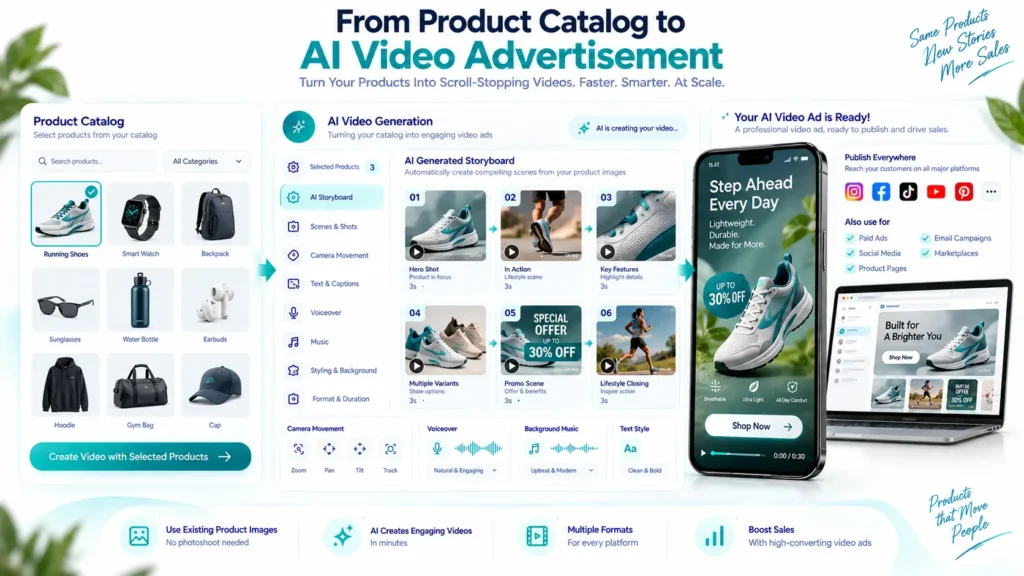
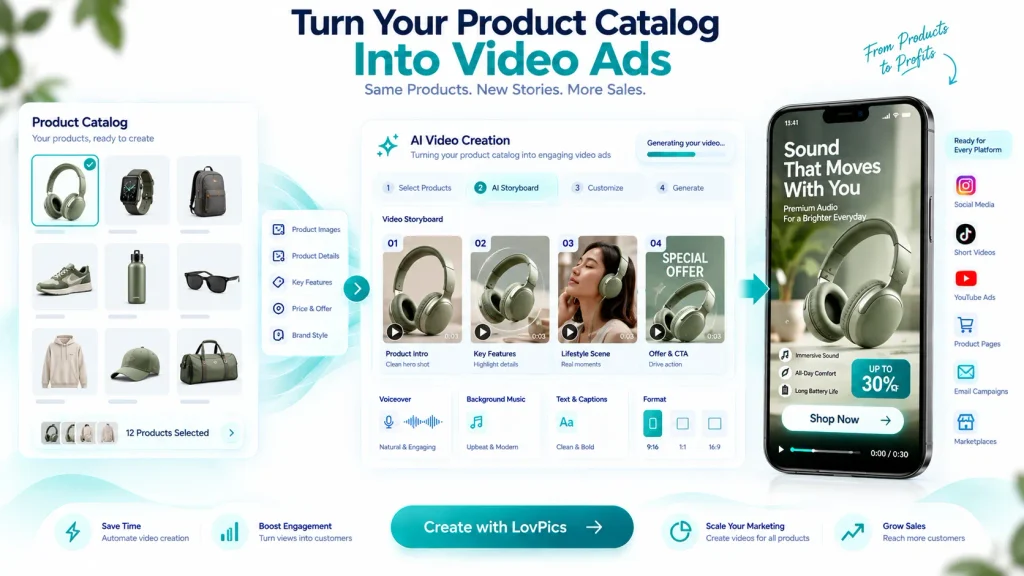
The basic concept is simple: Product Catalog → Product Selection → Video Concept → Storyboard → AI Video → Advertisement
The first step is selecting the products that should appear in the campaign.
Instead of trying to turn an entire catalog into one video, businesses should group products according to a clear advertising objective.
For example:
New Collection: Select newly launched products and build a launch-focused video.
Best Sellers: Select products with strong sales performance and create a social proof or conversion-focused campaign.
Seasonal Collection: Group products around a seasonal theme.
Limited-Time Offer: Combine selected products with promotional messaging and a clear CTA.
Category Campaign: Create a video around a product category such as footwear, cosmetics, jewellery, or home décor.
This approach makes the resulting video more focused and easier for customers to understand.
A Practical Workflow for Creating an AI Video Ad from a Product Catalog
Step 1: Organize Your Product Catalog
Start with clean product images. The better the source material, the easier it is to create a convincing advertisement.
Ideally, product images should clearly show:
- The complete product
- Important details
- Correct proportions
- Product colors
- Packaging where relevant
- Important labels
- Multiple angles when available
For fashion products, consistent catalog imagery can also make it easier to build campaign-level creative.
LovPics supports product-focused visual workflows where businesses can upload product references and generate catalog-ready visuals. (Lovpics)
Step 2: Choose Products for the Campaign
Do not simply choose products because they exist in the catalog. Choose them because they support the campaign objective.
For example:
- Campaign objective: Increase sales of best-selling products
- Select five to ten strong products.
- Campaign objective: Launch a new collection
- Select products from the new collection.
- Campaign objective: Promote a discount
- Select products that are included in the offer.
- Campaign objective: Build awareness
- Select visually distinctive products that can create a strong first impression.
The product selection determines the quality and clarity of the final video.
Step 3: Define the Advertising Message
A product video and a product advertisement are not necessarily the same thing. A product video can simply demonstrate the product. An advertisement needs a reason for the viewer to care. Before generating the video, decide what the viewer should understand.
For example:
- New summer collection is here.
- Upgrade your everyday essentials.
- 20% off selected products.
- Discover our best-selling products.
- Designed for everyday comfort.
The message should be short enough to work within the video duration.
Step 4: Build a Simple Video Structure
A strong product advertisement usually follows a simple progression.
Hook → Product → Benefit → Proof or Feature → Offer → CTA
For example:
0-3 seconds: Attention-grabbing opening.
3-7 seconds: Show the product.
7-12 seconds: Highlight important features or benefits.
12-15 seconds: Show offer and CTA.
For a longer 30-second advertisement, additional products, use cases, or benefits can be introduced.
LovPics Product Reels supports 15-second and 30-second timelines and uses storyboard beats for product-focused video creation.
Step 5: Create the Storyboard Before Rendering
One of the most important parts of AI video production is planning the sequence before generating the final video.
A storyboard can define:
- Opening shot
- Product presentation
- Camera movement
- Product close-up
- Feature callout
- Lifestyle scene
- Offer
- CTA
For example:
- Scene 1: Product appears with an attention-grabbing motion.
- Scene 2: Camera moves closer to highlight product details.
- Scene 3: Product appears in a relevant lifestyle environment.
- Scene 4: Key benefit appears as supporting text.
- Scene 5: Offer and CTA close the advertisement.
LovPics uses a concept-to-storyboard-to-video workflow for Product Reels, allowing teams to review the storyboard before the reel is rendered. (Lovpics)
Step 6: Generate the AI Video
Once the storyboard is approved, generate the video.
AI can introduce movement to otherwise static product references.
Depending on the creative direction, this may include:
- Camera movement
- Product rotation
- Close-ups
- Scene transitions
- Lifestyle environments
- Product-focused animations
- Text overlays
- Voiceover
- Music
- CTA sequences
The goal is not simply to make the product move.
The movement should support the advertising message.
Step 7: Add Branding and CTA
A video advertisement should make it clear who is selling the product and what the customer should do next.
Depending on the campaign, this could include:
- Logo
- Brand colors
- Product name
- Offer
- Website
- Discount
- Call to action
A CTA could be:
Shop Now
- Explore Collection
- Buy Now
- Discover More
- Get the Offer
LovPics AI Reels supports brand finishing options such as logo placement and optional outro cards. (Lovpics)
Step 8: Create Platform-Specific Versions
One video does not necessarily need to serve every platform in exactly the same way.
A social media Reel may use a vertical 9:16 format.
A YouTube advertisement may require a landscape version.
A marketplace placement may have different requirements.
LovPics AI Reels supports vertical 9:16 outputs for Reels, Shorts, and paid social, with 16:9 landscape also available for YouTube and display placements. (Lovpics)
This means businesses can build a core campaign and adapt the creative for different distribution channels.
How Businesses Can Scale Catalog-Based Video Advertising
The real advantage of AI video advertising becomes visible when businesses move beyond individual videos.
Imagine an ecommerce catalog containing 1,000 products.
Traditional production might encourage the business to decide which 20 or 30 products are important enough to justify video production.
AI changes the economics of that decision.
Businesses can create structured video campaigns around different catalog segments.
For example:
1,000 products
↓
20 product categories
↓
10 campaign themes
↓
Multiple product-focused video variations
This creates a repeatable production system rather than a collection of one-off videos.
Build Reusable Video Structures
Instead of developing a completely new creative structure every time, create reusable templates.
For example:
Product Launch Template : Hook → New Product → Features → Benefit → CTA
Offer Template : Offer → Product → Benefit → Discount → CTA
Best Seller Template : Hook → Best Seller → Product Details → Social Proof → CTA
Collection Template : Collection Hook → Multiple Products → Key Theme → CTA
Reusable structures reduce planning time and create greater consistency across campaigns.
Turn Catalog Updates Into Content Opportunities
Product catalogs change constantly.
- New products arrive.
- Old products go out of stock.
- Prices change.
- Offers change.
- Collections change.
Instead of treating catalog updates only as ecommerce maintenance, businesses can turn them into content triggers.
- A new product can become a launch video.
- A new collection can become a campaign.
- A seasonal update can become a Reel.
- A promotion can become an advertisement.
This creates a closer relationship between catalog management and marketing content production.
Related LovPics AI Video Solutions
Businesses creating catalog-based video ads can combine multiple LovPics capabilities depending on the campaign.
- AI Product Video: Turn product images into short-form video content for ecommerce and marketing campaigns.
- Product Reels: Create catalog-clean, multi-beat product reels with hero shots, feature callouts, and CTA beats.
- UGC Product Showcase: Add a creator-led format when a product demonstration or presenter-style advertisement is more appropriate.
- Multilingual AI Reels: Adapt campaigns for audiences that speak different languages.
- AI Product Photography: Create or improve the product visuals that become the foundation for video campaigns.
- E-Commerce Pack: Generate product, model, banner, and poster assets from a product image as part of a broader ecommerce content workflow.
- AI Banner Generator: Extend the campaign from video into static advertising formats.
- AI 360° Product Views: Create additional product visualization assets that can complement video advertising.
- AI Fashion Catalog Photos: Build consistent fashion catalog imagery that can provide additional references for campaign production.
- AI Reels: Build broader social campaigns using product, UGC, jewellery, saree, multilingual, and animated reel workflows.
Real-World Applications
New Product Launches
When a new product enters the catalog, businesses can immediately create launch-oriented video content. The video can introduce the product, highlight its key features, demonstrate its use, and finish with a CTA. This is particularly useful when the business needs promotional content before a traditional photoshoot or campaign production can be arranged.
Seasonal Campaigns
Catalog products can be grouped around seasonal campaigns such as summer collections, festive promotions, holiday shopping, or end-of-season sales. Instead of producing a completely new campaign from scratch, businesses can use existing product assets and create a new video narrative around them.
Best-Seller Advertisements
A catalog can also become a source for performance advertising. Businesses can identify their best-selling products and turn them into focused video advertisements. The creative can emphasize the product’s strongest benefits and direct viewers toward the purchase page.
Discount and Promotional Campaigns
When a business launches a sale, speed becomes important. An AI workflow can help transform existing product references into promotional videos without requiring a new production cycle.
The creative can focus on:
- Product
- Offer
- Deadline
- Benefit
- CTA
Collection Marketing
Instead of advertising one product at a time, businesses can create videos around collections.
For example:
- Summer Collection
- New Jewellery Collection
- Office Wear Collection
- Home Essentials
- Premium Electronics
The catalog provides the products, while the video creates the narrative connecting them.
Retargeting Campaigns
Different customers may have interacted with different products. A brand can create product-focused creatives that align with the products or categories customers have already shown interest in. This can make advertising more relevant than showing a completely generic brand advertisement.
Marketplace Marketing
Product videos can also support ecommerce marketplace strategies. Businesses can create additional visual content around their product catalog rather than relying exclusively on static listing images. The exact format and marketplace requirements should always be checked before publishing.
Across the LovPics Ecosystem
The strongest catalog-to-video workflow does not treat video as an isolated asset. It connects video creation with the rest of the product content pipeline.
A single product reference can become: Product Image → AI Product Photos → Lifestyle Visuals → Product Video → AI Reel → Banner → Social Creative → Advertising Campaign
This creates a more efficient content ecosystem. Instead of repeatedly recreating the product for every marketing format, businesses can reuse the same core product reference across multiple creative workflows.
LovPics positions its platform around this broader ecommerce visual production workflow, covering product photos, videos, ads, Reels, banners, and other marketing assets.
Expand AI Video Ads from Product Catalogs with LovPics
The biggest opportunity is not simply turning one product image into one video. It is building a repeatable system where your catalog continuously produces marketing content.
For example:
Product Catalog
- Select products
- Define campaign
- Generate concept
- Approve storyboard
- Create AI video
- Add branding
- Add CTA
- Export
- Publish
- Test
- Create the next variation
This creates a production loop that can continue throughout the year.
A business can use the same approach for launches, promotions, seasonal campaigns, best sellers, category campaigns, and social content.
The catalog becomes the foundation. AI becomes the production layer. Marketing becomes the distribution layer.
Common Mistakes Businesses Make
Trying to Put Too Many Products Into One Video
A common mistake is attempting to showcase an entire catalog in a single advertisement.
This usually creates a crowded video where individual products receive very little attention.
Better approach: Group products by campaign, category, audience, or objective.
Starting Without a Clear Advertising Goal
A video can look attractive but still fail as an advertisement.
If the viewer does not understand what the product is, why it matters, or what to do next, the creative may not perform well.
Better approach: Define the campaign objective before generating the video.
Treating the Catalog Image as the Entire Advertisement
A product image is the starting point, not the complete creative strategy.
The advertisement still needs a hook, narrative, benefit, and CTA.
Better approach: Use the catalog image as the product reference and build a marketing story around it.
Overloading the Video With Text
Too much text can compete with the product and make short-form video difficult to follow.
Better approach: Use short, high-value messages that support the visual sequence.
Ignoring Product Accuracy
AI-generated environments and motion should never compromise the product itself.
Incorrect product shapes, colors, labels, packaging, or important details can damage customer trust.
Better approach: Use strong product references and review the final output carefully before publishing.
Creating One Version for Every Platform
A creative designed for vertical social video may not work equally well in a landscape placement.
Better approach: Create platform-appropriate versions from the same campaign concept.
Focusing Only on Production Speed
AI makes production faster, but faster production does not automatically mean better advertising.
Better approach: Use the additional production capacity to test stronger hooks, messages, product combinations, and CTAs.
The Future of Catalog-Based Video Advertising
Ecommerce catalogs are becoming more than databases of products.
They are becoming structured sources of marketing content.
As AI video generation becomes integrated with product information, businesses will increasingly be able to move from:
Product Data → Creative Concept → Video Advertisement
without rebuilding the production process every time.
This could change how ecommerce teams think about content production.
Instead of producing a small number of expensive campaigns, brands can create more targeted creative variations and continuously test them.
A catalog update could trigger new content.
A new product could trigger a launch video.
A seasonal category could trigger a campaign.
A promotion could trigger a new advertisement.
The result is a more responsive content operation where marketing assets can move closer to the speed of the ecommerce business itself.
Comparison Table
| Approach | Production Speed | Scalability | Creative Flexibility | Best For |
| Traditional Video Shoot | Slow | Low | High | Premium campaign productions |
| Freelance Video Editing | Medium | Medium | Medium | Smaller campaign volumes |
| Template-Based Video | Fast | Medium | Medium | Repeated campaign formats |
| AI Video from Catalog | Fast | High | High | Ecommerce catalogs and frequent campaigns |
| AI Reels Workflow | Fast | High | High | Social media and paid social campaigns |
Decision Matrix
| Business Need | Recommended Approach |
| One premium hero campaign | Traditional production |
| A few product videos | Template or freelance production |
| Large product catalog | AI catalog-to-video workflow |
| Frequent social campaigns | AI Reels |
| Product-focused paid ads | Product Reels / AI video |
| Creator-led advertisements | UGC Product Showcase |
| Multiple regional audiences | AI video + multilingual workflows |
| Frequent promotions | Reusable AI video templates |
Frequently Asked Questions
Can I create an AI video ad using only product catalog images?
Yes. Product images can serve as visual references for AI video workflows. LovPics supports product-focused video workflows where businesses upload product references and generate storyboards and videos.
Do I need to shoot a new video for every product?
Not necessarily. Existing product images can be used as the starting point for AI-generated video content, reducing the need for separate traditional video shoots.
How many products should I include in one AI video ad?
There is no universal number. For short-form advertising, fewer products with a clear campaign message are often easier to understand than trying to showcase an entire catalog.
Can I create different ads from the same product catalog?
Yes. The same catalog can support different campaigns based on products, categories, offers, customer segments, seasons, and marketing objectives.
Can AI video ads include offers and CTAs?
Yes. You can incorporate offers, benefits, promotional messages, and calls to action into the creative structure. LovPics Product Reels specifically supports beats for hooks, benefits, and conversion CTAs.
Can I use AI video ads for social media?
Yes. You can create AI video content for platforms such as Instagram Reels, YouTube Shorts, and paid social campaigns. LovPics AI Reels is designed around vertical 9:16 social video workflows.
Can I create a video for multiple products in the same category?
Yes. Collection and category-based campaigns are a practical way to turn multiple catalog products into a single advertising narrative.
Should every product have its own video?
Not necessarily. Businesses should prioritize products based on sales performance, campaign goals, inventory, margins, seasonality, and advertising opportunities.
Can I create different versions of the same advertisement?
Yes. A reusable campaign structure can be adapted with different products, messages, offers, hooks, and CTAs.
What is the biggest advantage of turning a product catalog into video ads?
The biggest advantage is scalability. Instead of treating video production as a separate project for every product, businesses can use their existing catalog as a repeatable source for marketing content.
Conclusion
Creating video advertisements from a product catalog does not have to begin with a camera, studio, or traditional production team.
For many ecommerce businesses, the starting point already exists in their catalog.
Product images can become visual references for AI-generated scenes, storyboards, product demonstrations, promotional sequences, Reels, and advertising creatives.
The key is to build a structured workflow:
Select the right products → define the campaign → create the storyboard → generate the video → add branding and CTA → adapt for each platform → test and optimize.
The real opportunity is not creating one AI video.
It is creating a repeatable system that turns an entire product catalog into a continuous source of marketing content.
With the right workflow, ecommerce brands can move from catalog images to video advertising faster, test more creative ideas, and scale product-focused campaigns without making traditional video production the bottleneck.