How to Create AI Videos for Product Education

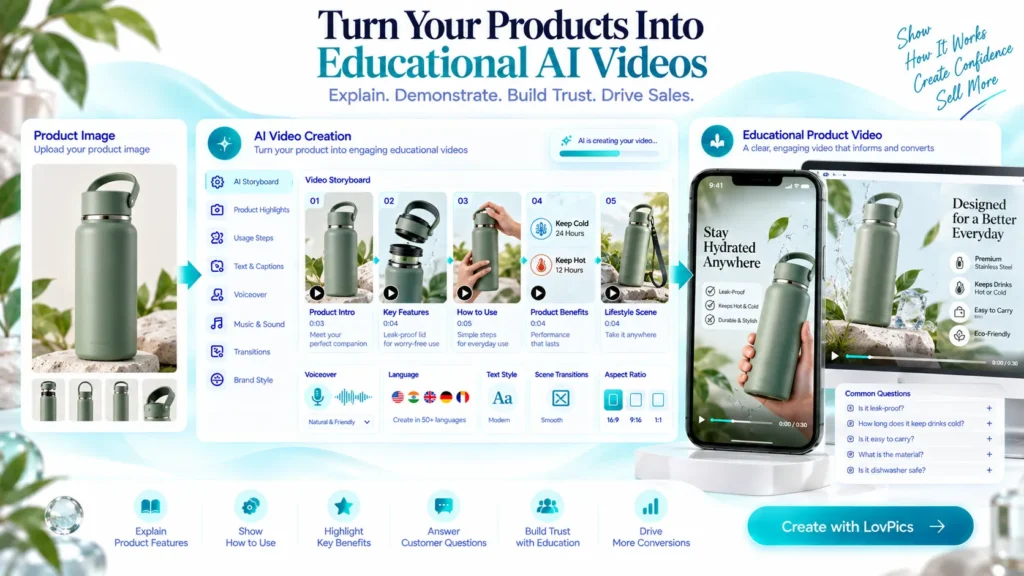
AI Videos for Product Education help businesses explain product features, demonstrate usage, answer common questions, and show customers how a product works before they buy. A product can have excellent features, but customers cannot appreciate those features if they do not understand how the product works.
This is especially important for ecommerce. Customers cannot physically pick up a product, examine it from different angles, ask a salesperson a question, or watch someone demonstrate how it works. Product pages therefore need to communicate much more than product names and specifications.
Product education videos can bridge that gap. A short video can show how a product works, explain its key features, demonstrate the correct way to use it, answer common questions, and help customers understand its value before they buy.
The challenge is that traditional product education videos can take considerable time and resources to produce. Teams may need demonstrations, filming, presenters, scripts, editing, voiceovers, graphics, and multiple versions for different products.
AI changes that workflow. With the right product images, information, references, and creative direction, businesses can create educational videos that turn static product information into understandable visual experiences.
Why Product Education Works Better in Video
Product education is fundamentally about reducing uncertainty.
A customer may see a product image and understand what the product looks like, but still have questions:
- How does it work?
- How should I use it?
- What does this feature actually do?
- What problem does it solve?
- How is it different from another product?
- What should I know before purchasing?
- How do I get started after receiving it?
Text can answer these questions, but video can often demonstrate the answer more naturally.
For example, a skincare brand can explain the application process visually. A consumer electronics brand can demonstrate controls and features. A kitchen appliance brand can show the steps required to prepare something. A fashion brand can demonstrate fit, styling, or product details.
The educational value comes from showing information in context.
AI makes it possible to turn these educational concepts into repeatable video workflows instead of treating every video as a completely new production project.
The Product Education Content Challenge
Creating educational content becomes difficult when businesses have large product catalogs.
One product may need a feature overview. Another may require a usage tutorial. A third may need a comparison between product variants. A fourth may need a short FAQ-style video.
Traditional production makes each variation expensive.
Teams may need to:
- Write a script
- Arrange a product demonstration
- Capture multiple shots
- Record narration
- Create animations or labels
- Edit the footage
- Add branding
- Create different aspect ratios
- Produce updated versions when product information changes
This becomes even more difficult when products are frequently updated, or new products are launched every month.
AI video creation can reduce the amount of manual production required by turning existing product assets and information into structured video concepts.
The goal is not simply to make videos faster. The bigger opportunity is to create a repeatable system for explaining products consistently.
Types of Product Education Videos Businesses Can Create
Product education does not have to mean a long tutorial. Different stages of the customer journey require different levels of explanation.
Feature Explanation Videos
These videos focus on one or more important product features.
Instead of displaying a specification in a product description, the video can visually introduce the feature and explain its benefit.
A product video might show: Feature → How it works → Customer benefit
This format works particularly well when a product has features that are difficult to communicate through static images.
Product Demonstration Videos
Demonstration videos show the product being used.
The viewer can see the sequence of actions rather than simply reading instructions.
This can be useful for:
- Appliances
- Consumer electronics
- Beauty products
- Kitchen products
- Tools
- Fitness products
- Accessories
- Home products
The demonstration should focus on the actual customer task rather than unnecessary cinematic shots.
How-To Videos
How-to videos answer a specific usage question.
Examples include:
- How to use the product
- How to set it up
- How to apply it
- How to clean it
- How to assemble it
- How to change a setting
- How to use a particular feature
A simple sequence of steps can make the video immediately useful.
Product Setup Videos
Some products require customers to complete several steps before they can use them.
A short setup video can reduce confusion immediately after purchase.
The structure can be: Unbox → Prepare → Connect → Configure → Start using
This type of content can also become part of post-purchase communication.
Product Comparison Videos
Customers often need help deciding between variants. An educational video can explain the differences between models, sizes, configurations, colors, or feature sets. Instead of saying only that Product A has Feature X and Product B does not, the video can explain why that difference matters.
FAQ Videos
Businesses can turn frequently asked product questions into short videos.
For example:
Question: How long does the battery last?
Answer: Explain the relevant information visually and clearly.
This approach transforms customer support questions into reusable educational content.
Product Care and Maintenance Videos
Education does not stop after the purchase.
Videos can explain:
- Cleaning
- Storage
- Maintenance
- Replacement parts
- Safe usage
- Care instructions
- Long-term product handling
This type of content can improve the customer’s experience after purchase while reducing repetitive questions.
How to Create an AI Video for Product Education
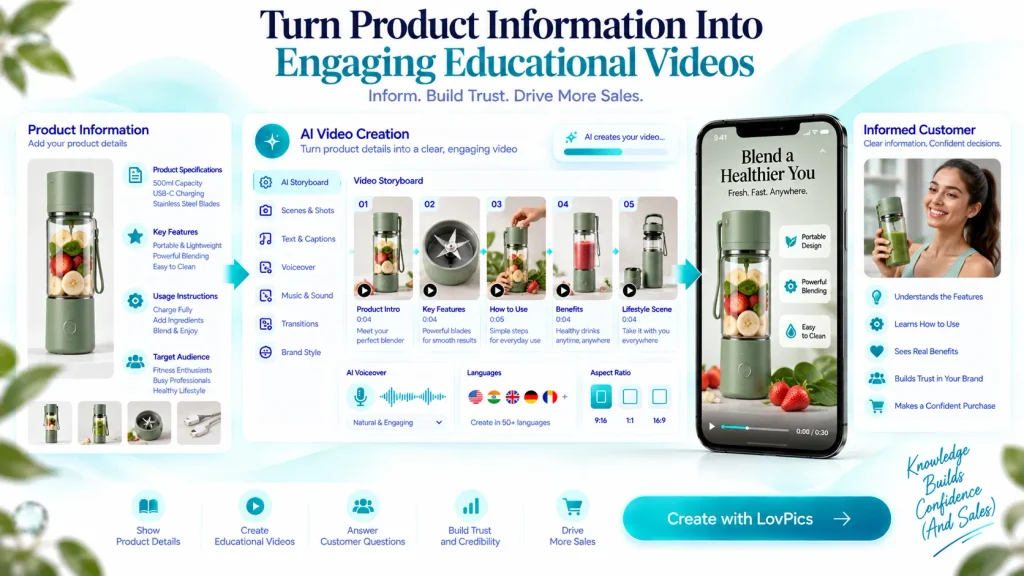
Creating a useful educational video starts with the information, not the visual effects.
Start With the Customer’s Question
Before creating a video, identify the question the customer needs answered.
Avoid starting with: “How can we make this product look impressive?”
Instead ask: “What does the customer need to understand?”
For example:
Weak objective: Create a beautiful video about our blender.
Better objective: Show a customer how to use the blender’s three main functions.
The second objective gives the video a clear educational purpose.
Choose One Learning Objective
Short educational videos work best when they have a clear purpose.
A single video could explain:
- One important feature
- One usage process
- One setup procedure
- One common problem
- One product comparison
- One frequently asked question
Trying to explain everything in one video can make the content difficult to follow.
Organize the Information Into Scenes
Once the learning objective is clear, divide the explanation into visual beats.
A simple structure might look like:
- Introduce the product
- Identify the feature
- Demonstrate how it works
- Explain the benefit
- Show the result
- Provide the next step
This gives the AI video workflow a clear narrative.
LovPics can turn product references into storyboard-driven video concepts, allowing businesses to structure the content before generating the final video.
Use Product Images as Visual References
Product education videos need to accurately represent the product being explained.
Start with high-quality product references.
These may include:
- Product photography
- Multiple product angles
- Detail shots
- Packaging images
- Existing campaign imagery
- Brand references
Good product references give the video creation process stronger visual foundations.
For ecommerce teams, this means existing product photography can become the starting point for new educational content instead of requiring an entirely new photoshoot.
Add Clear Visual Explanations
Educational videos should make information easier to understand.
Useful visual elements include:
- Feature labels
- Arrows
- Zoomed details
- Step indicators
- On-screen text
- Product callouts
- Before-and-after views
- Animated transitions
The visual treatment should support the explanation rather than distract from it.
Write a Simple Voiceover
Voiceover can provide context while the visuals demonstrate the product.
A useful product education script should be:
- Clear
- Concise
- Specific
- Easy to understand
- Focused on customer benefits
Avoid turning the script into a product brochure.
Instead of listing every specification, explain the information that helps the customer use or evaluate the product.
Generate the Video
Once the product references, storyboard, script, and visual direction are ready, the video can be generated. AI video workflows can combine product imagery, scenes, motion, voiceover pacing, music, branding, and calls to action into a finished asset. For ecommerce teams, this makes it possible to create multiple educational videos without rebuilding a traditional production workflow for every product.
Review for Accuracy
Educational content has one requirement that entertainment content does not: accuracy.
Review:
- Product appearance
- Product features
- Instructions
- Labels
- Measurements
- Product variants
- Voiceover
- On-screen text
- Sequence of steps
AI can accelerate production, but businesses should still verify that the final video communicates the correct product information.
Export for the Right Channel
The same educational concept may need different versions.
For example:
- 9:16 for Reels and Shorts
- 16:9 for YouTube or website embeds
- Short versions for product pages
- Longer versions for tutorials
- Cut-down clips for social media
Creating content in a reusable format makes it easier to distribute education across multiple customer touchpoints.
How Businesses Can Scale Product Education With AI
The biggest advantage of AI product education is not creating one video.
It is creating a system. Imagine an ecommerce brand with 500 products.
Creating traditional educational videos for every product could require substantial production resources. An AI-assisted workflow can instead establish repeatable structures.
The business can create templates for:
Feature Explainer : Product → Feature → Demonstration → Benefit
How-To : Question → Step 1 → Step 2 → Step 3 → Result
Product Comparison: Option A → Key Difference → Option B → Best Use Case
FAQ: Question → Explanation → Demonstration → Answer
These structures can then be adapted across products.
LovPics reusable templates can help teams retain effective visual structures and apply them across collections and campaigns.
This creates consistency while reducing repetitive creative work.
Build a Product Education Library
Businesses should think beyond individual videos.
Create a library organized around:
- Product
- Feature
- Customer question
- Usage stage
- Product category
- Customer journey stage
A single product might eventually have several educational assets:
- Product introduction
- Feature explanation
- Setup tutorial
- Usage demonstration
- FAQ
- Maintenance guide
This creates a richer educational experience without requiring every video to serve every purpose.
Repurpose One Educational Concept
One product education video can become multiple content assets.
For example:
Long educational video → Short feature clip → Social Reel → Product page video → FAQ clip → Customer support resource
This approach allows businesses to get more value from every piece of educational content.
Related LovPics AI Video Solutions
Businesses creating product education videos can combine several LovPics capabilities depending on the content they need.
AI Product Video Maker
Use product images and brand assets to create short-form product videos for ecommerce, social media, and marketplace use.
Product Reels
Turn product stills into structured vertical videos with multiple beats, feature callouts, and CTA moments.
UGC Product Showcase Reels
Combine product references with a creator-style presentation when product education benefits from a presenter or spokesperson format.
AI Reels
Create storyboard-driven vertical videos with voiceover pacing, music, branding, and optional outros.
AI Product Photography
Create or improve the product imagery used as the visual foundation for educational videos.
AI 360° View
Use multi-angle product visuals when education requires customers to understand the product from different perspectives.
AI Fashion Photoshoot
Create on-model fashion visuals when product education needs to explain fit, styling, or how an apparel product looks when worn.
E-Commerce Pack
Generate coordinated product images, model visuals, banners, and other ecommerce assets that can support a broader product education strategy.
AI Banner Generator
Create supporting visual assets for product pages and campaigns that reinforce the information presented in educational videos.
Reusable Templates
Save successful video and creative structures so product education can be produced consistently across larger catalogs.
Real-World Applications for Product Education Videos
Consumer Electronics
Electronics brands often have products with multiple features, controls, and settings.
A short educational video can show how to activate a feature, connect a device, change a setting, or use a particular function.
Beauty and Skincare
Beauty brands can visually demonstrate application techniques, product routines, recommended usage, and product combinations.
The video can show the process while the voiceover explains the important details.
Fashion and Apparel
Fashion education can explain fit, styling, fabric details, garment features, and different ways to wear a product.
For products with multiple styling possibilities, visual demonstrations can communicate the value more effectively than text alone.
Home and Kitchen Products
Products such as appliances, cookware, organizers, and household tools often benefit from demonstration.
A customer can see exactly how the product fits into an everyday task.
Fitness Products
Fitness equipment and accessories can use educational videos to demonstrate setup, usage, adjustments, and product-specific features.
The objective should be to make the customer feel confident using the product.
B2B and Technical Products
Complex products often require more explanation than consumer products.
AI-generated educational videos can break technical information into smaller modules that are easier for customers, sales teams, and distributors to consume.
Across the LovPics Ecosystem
Product education works best when video is connected to the rest of the visual content pipeline.
A business might begin with AI product photography to create clean product references. Those visuals can then support product concepts, banners, ecommerce images, 360° views, and video content.
Product education can therefore become part of a broader AI content production system rather than an isolated video project.
For example: Product Image → Product Concept → Educational Video → Product Page → Social Content
This creates consistency between the visuals customers see across different stages of their journey.
Expand Product Education With LovPics
LovPics can help businesses turn existing product assets into more useful visual content.
Instead of treating product education as a separate production project, teams can connect product photography, creative concepts, video generation, reusable templates, and ecommerce content within a repeatable workflow.
The result is a more scalable approach to product education.
Businesses can create educational videos for new products, update existing content, test different explanations, and adapt content for different channels without relying entirely on traditional production.
The objective is simple: help customers understand the product before they make a decision.
Common Mistakes Businesses Make With Product Education Videos
Trying to Explain Everything in One Video
A product may have dozens of features, but putting them all into one video can overwhelm the viewer.
Better approach: Create a series of focused videos, each answering one important customer question.
Focusing on Features Instead of Understanding
A list of features does not necessarily educate the customer.
Better approach: Explain what the feature does, how it works, and why the customer should care.
Making the Video Too Long
Long videos are not automatically more educational.
Better approach: Remove information that does not contribute to the video’s learning objective.
Using Visual Effects That Distract
Transitions, animations, and effects can make a video look impressive while making the explanation harder to follow.
Better approach: Use visual effects to clarify information, not simply decorate the video.
Forgetting the Beginner
Businesses know their products extremely well. Customers may not.
Technical terminology that feels obvious to an internal team can confuse a first-time buyer.
Better approach: Write for someone who has never used the product before.
Not Showing the Actual Product
Generic visuals can weaken an educational video when the customer needs to understand a specific product.
Better approach: Use accurate product references and clearly connect the explanation to the actual product.
Ignoring Mobile Viewing
Many customers will encounter product education content on mobile devices.
Better approach: Design vertical versions with readable text, clear visuals, and strong scene composition.
Treating AI Generation as the Final Step
Generating a video does not automatically make it educational.
Better approach: Review the finished video from the customer’s perspective. Ask whether someone unfamiliar with the product could actually understand it.
The Future of AI Product Education
Product education is moving from static information toward visual, interactive, and personalized experiences.
As AI video creation becomes more accessible, businesses will be able to produce educational content for increasingly specific customer questions.
Instead of creating one generic product video, brands can create multiple explanations based on:
- Product type
- Customer segment
- Feature
- Usage scenario
- Language
- Sales channel
- Customer journey stage
This can make product education more relevant without requiring traditional video production for every variation. The larger shift is from creating content occasionally to building a continuous visual education system. For ecommerce brands with large catalogs, that shift can be especially valuable.
Frequently Asked Questions
What are AI videos for product education?
AI videos for product education are videos created with AI-assisted workflows to explain product features, demonstrate usage, answer customer questions, or provide instructions.
Can AI create product education videos from product images?
Yes. Product images can serve as visual references for AI-assisted video creation. Additional information such as product features, scripts, references, and desired scenes can help structure the educational content.
What should a product education video include?
It should have a clear learning objective, relevant product visuals, simple explanations, and a logical sequence. Depending on the purpose, it may also include voiceover, feature labels, demonstrations, or step-by-step instructions.
How long should an AI product education video be?
There is no universal ideal length. A video should be long enough to answer its specific question without adding unnecessary information. A simple feature explanation may only need a short video, while a detailed tutorial may require more time.
Can product education videos be used on ecommerce product pages?
Yes. Product education videos can help customers understand product features, usage, and benefits directly on product pages.
Can one product education video be reused for social media?
Yes. A longer educational video can often be adapted into shorter clips for Reels, Shorts, advertisements, and other social formats.
Should AI-generated product education videos be reviewed?
Yes. Businesses should review product accuracy, instructions, visuals, voiceover, on-screen text, and product representation before publishing educational content.
Can AI product education videos support multilingual audiences?
Yes. Educational video workflows can be adapted into different languages, allowing businesses to create localized versions for different markets and customer groups.
What products benefit most from educational videos?
Products with multiple features, usage steps, setup requirements, technical details, or common customer questions can benefit significantly from educational video content.
Conclusion
Product education is ultimately about helping customers make better decisions.
A product image can show what something looks like. A description can explain its specifications. An educational video can demonstrate how those specifications translate into real-world use.
AI makes it easier for businesses to produce that kind of content at scale.
By starting with customer questions, defining a clear learning objective, organizing information into scenes, using accurate product references, adding concise explanations, and reviewing the final result carefully, businesses can turn product information into useful visual experiences.
For ecommerce brands managing large catalogs, this creates an opportunity to move beyond simply showing products.
They can teach customers how products work, demonstrate their value, and build confidence before and after purchase.