AI Video Marketing for Real Estate: How to Showcase Properties with AI

AI Video Marketing for Real Estate gives agents, brokers, developers, and property marketers a practical way to turn property visuals into engaging video content. Real estate is an inherently visual business. Before contacting an agent, scheduling a site visit, or making an enquiry, potential buyers and tenants often want to understand what a property looks like.
They want to see the exterior, living spaces, bedrooms, kitchen, bathrooms, balcony, amenities, surrounding environment, and other important features.
Traditionally, real estate marketers have relied on property photography, walkthrough videos, professional videography, drone footage, and virtual tours to communicate this information. These formats remain valuable, but producing video content for every property can be demanding.
A real estate agency may manage dozens of listings at the same time. Developers may need to market multiple units across several projects. Property portals and brokers may need fresh content for social media, advertisements, and individual listings.
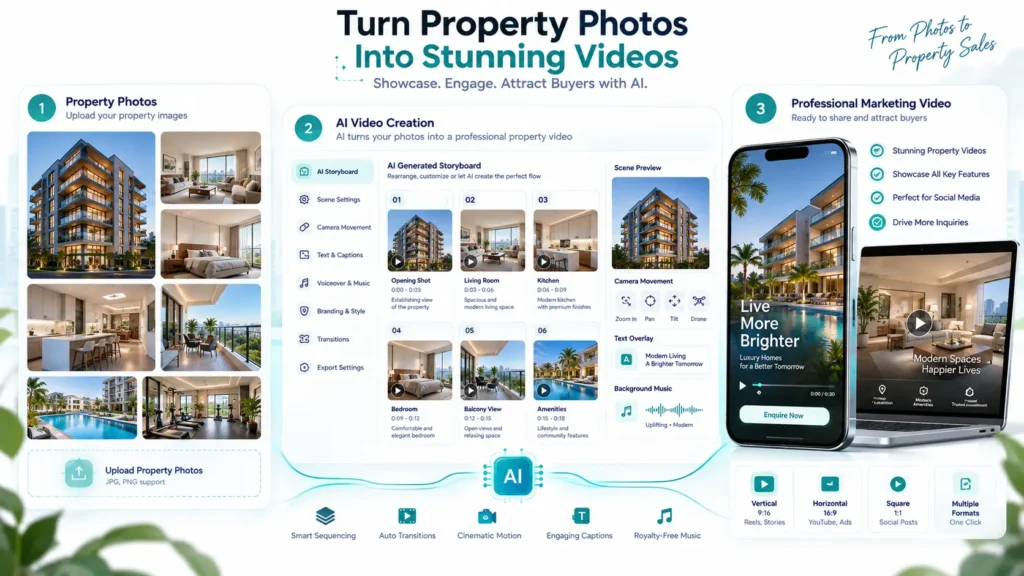
AI video marketing offers another way to extend existing property photography into video content. Instead of treating every property video as a completely new production project, marketers can use existing property images as visual references and create structured video content around them.
This makes AI Video Marketing for Real Estate particularly useful for property listings, social media campaigns, project launches, rental marketing, lead generation, and property advertisements.
The goal is not simply to make a property look cinematic. The goal is to communicate the property clearly, attract qualified attention, and encourage the viewer to take the next step.
Why Video Is Important for Real Estate Marketing
Real estate decisions involve significant consideration. A buyer may want to understand the property before investing time in a site visit. Video can help create that initial visual understanding.
Properties Are Easier to Understand Through Multiple Visuals
A single photograph only shows one angle.
A sequence of images or video can communicate:
- Property exterior
- Entrance
- Living room
- Bedroom
- Kitchen
- Bathroom
- Balcony
- Amenities
- Interior details
- Overall layout impression
The more effectively these elements are presented, the easier it becomes for viewers to understand the property.
Video Can Bring Static Listings to Life
Property photographs are essential, but they remain static. AI-generated motion can create a more dynamic presentation from existing images.
A sequence might move from: Exterior → Living Room → Kitchen → Bedroom → Balcony → Amenities → CTA
This creates a simple visual journey through the property.
Real Estate Marketing Requires Frequent Content
Agents and developers need content for:
- Property listings
- YouTube
- Short-form video
- Paid advertising
- Property launches
- Project announcements
- Rental campaigns
- Lead-generation campaigns
An AI-assisted workflow can make it easier to create additional video content from existing visual assets.
The Challenges of Traditional Property Video Production
Professional real estate video production can create impressive results, but it also requires planning and resources.
Every Property Has Different Production Requirements
A luxury villa, apartment, office, retail property, and residential development may require different filming approaches.
Production teams may need to plan:
- Camera angles
- Lighting
- Movement
- Property preparation
- Scheduling
- Editing
- Music
- Voiceover
- Branding
Properties May Be Spread Across Multiple Locations
Real estate portfolios can cover many locations. Coordinating a physical video shoot for every property can become difficult, especially when listings are added frequently.
New Listings Need Content Quickly
Property marketing often operates on tight timelines. When a new property becomes available, marketers may need to publish content quickly. Waiting for a full production cycle can slow down the campaign.
Social Media Requires More Than One Video
A single property may need several creative assets.
For example:
- Property introduction
- Short social reel
- Feature-focused video
- Amenities video
- Promotional advertisement
- Retargeting creative
Creating each version through traditional production increases the workload.
What Is AI Video Marketing for Real Estate?
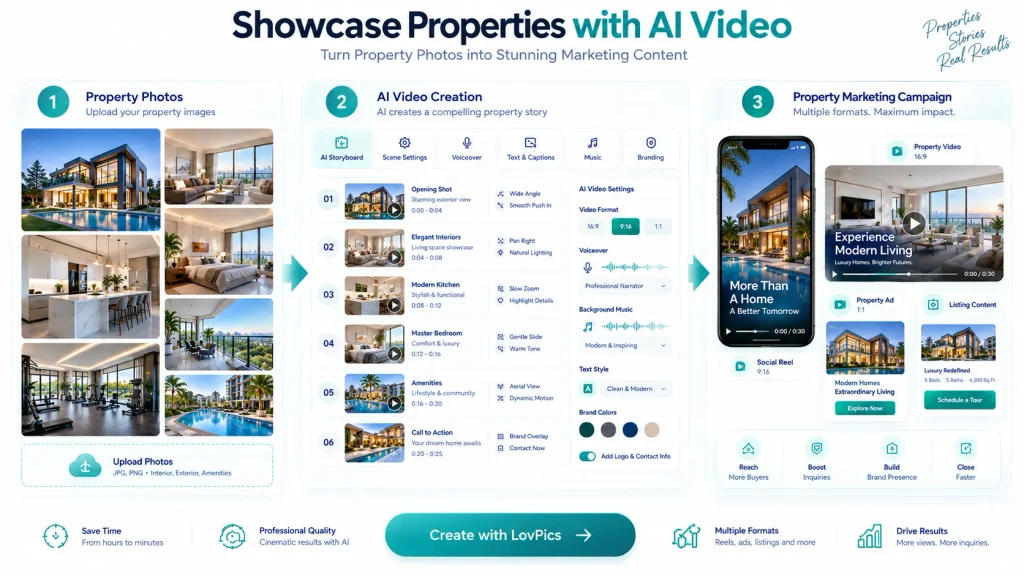
AI video marketing for real estate involves using AI-powered video creation workflows to transform property images, references, scripts, and creative instructions into marketing videos. Instead of beginning with a camera shoot, the process can begin with existing property photography.
The basic workflow is: Property Photos → Creative Direction → Storyboard → AI Video → Branding → Publish
Depending on the campaign, the video can focus on:
- Property overview
- Individual rooms
- Key amenities
- Architectural features
- Lifestyle presentation
- New project launches
- Rental listings
- Promotional offers
- Location-focused messaging
LovPics AI Video Gen supports up to four clip images, generates concepts for each clip, provides motion options including lifestyle and product showcase, accepts custom instructions, and supports 9:16 or 16:9 output.
For real estate, the same general image-to-video principle can be applied to property references, provided the marketer reviews the generated output carefully for accuracy.
Build a Real Estate Video Strategy Before Creating Content
The best results come from deciding what the video needs to accomplish before generating it.
Define the Property Marketing Objective
Different properties require different marketing messages.
You may want to:
- Generate enquiries
- Promote a new listing
- Generate site visits
- Promote a rental property
- Launch a new development
- Highlight premium amenities
- Reach investors
- Attract commercial tenants
The objective should influence the video structure.
Identify the Target Audience
A property video for a first-time homebuyer should not necessarily look like a video for a luxury investor.
Potential audiences include:
- First-time buyers
- Families
- Investors
- Luxury buyers
- Renters
- Commercial tenants
- Property investors
- NRIs
- Local buyers
The audience determines the language, tone, visuals, and CTA.
Decide the Property Story
A strong property video should have a clear sequence.
For example:
Opening – “Your new home in the heart of the city.”
Property – Show the exterior and key interiors.
Features – Highlight bedrooms, kitchen, balcony, amenities, and other relevant features.
Value – Communicate what makes the property attractive.
CTA – “Schedule a site visit.”
The exact message should be based on verified property information.
How to Create AI Videos for Real Estate
Step 1: Collect High-Quality Property Images
Start with the strongest available property photography.
Useful references may include:
- Exterior photographs
- Living room
- Bedrooms
- Kitchen
- Bathrooms
- Balcony
- Garden
- Amenities
- Lobby
- Parking
- Building entrance
Choose images that accurately represent the property.
Step 2: Organize the Images into a Story
Do not simply place photographs in random order. Think about how someone would experience the property.
A simple structure could be: Exterior → Entrance → Living Area → Kitchen → Bedroom → Amenities → CTA
This gives the video a logical flow.
Step 3: Select the Video Format
Choose the format based on the publishing channel.
9:16 Vertical
Useful for:
- Instagram Reels
- YouTube Shorts
- Mobile advertising
- Social media campaigns
16:9 Landscape
Useful for:
- YouTube
- Websites
- Presentations
- Property pages
- Desktop-focused campaigns
LovPics AI Video Gen supports both 9:16 and 16:9 formats.
Step 4: Define the Visual Style
The visual style should match the property.
A luxury apartment might benefit from:
- Elegant movement
- Premium lighting
- Clean compositions
- Sophisticated pacing
A family home might benefit from:
- Warm presentation
- Lifestyle-oriented scenes
- Natural movement
- Comfortable visual storytelling
A commercial property might need:
- Professional presentation
- Architecture-focused visuals
- Functional spaces
- Clear feature communication
Step 5: Define Camera Movement
Motion should help viewers understand the property.
Useful directions can include:
- Slow push-in
- Gentle pull-back
- Room reveal
- Camera pan
- Exterior reveal
- Architectural movement
- Lifestyle movement
Avoid excessive movement that makes the property difficult to examine.
Step 6: Write Specific Instructions
A generic instruction such as: "Create a property video." provides very little creative direction.
A more useful instruction could be:
“Create a premium real estate showcase using the supplied property image. Use a slow cinematic camera movement, natural lighting, realistic architectural presentation, subtle motion, and clean luxury property marketing aesthetics. Keep the property structure and visible features consistent with the reference.”Specific instructions help establish the intended presentation.
Step 7: Generate the Video
Once the property references and creative direction are ready, generate the video. When multiple images are used, each reference can represent a different segment of the property story.
LovPics AI Video Gen supports up to four clip images and can combine generated clips into a single video export.
Step 8: Review the Property Accuracy
This is one of the most important steps in real estate AI video creation. Real estate marketing must accurately represent the property.
Check:
- Building structure
- Room layout appearance
- Windows
- Doors
- Flooring
- Fixtures
- Furniture
- Kitchen design
- Bathroom features
- Exterior architecture
- Amenities
- Property proportions
Do not publish an AI-generated visual that makes the property appear materially different from the actual listing.
Step 9: Add Property Information
A property video may include verified information such as:
- Property type
- Location
- Number of bedrooms
- Area
- Key amenities
- Possession information
- Contact details
- Price, where appropriate
- Project name
- CTA
Avoid adding information that has not been verified.
Step 10: Add Branding, Music, and Subtitles
Branding helps the video feel like part of the agency or developer’s marketing system.
Consider:
- Company logo
- Brand identity
- Contact information
- CTA
- Website
- Campaign message
LovPics AI Video Gen supports company logo overlays, background music, advanced subtitles, and branded outro cards.
Step 11: Export and Publish
Once the video has been reviewed, export it for the intended channel.
Potential applications include:
- Property listings
- Social media
- Paid advertisements
- Website property pages
- Project landing pages
- Email campaigns
- Sales presentations
How Real Estate Businesses Can Scale AI Video Marketing
The real value of AI video becomes clearer when businesses create a repeatable system.
Start with High-Priority Properties
You do not need to create videos for every listing immediately.
Start with:
- Premium properties
- New listings
- High-value properties
- Properties with strong photography
- Properties receiving high traffic
- New development launches
- Properties being actively advertised
Create Multiple Videos from One Property
One property can support several video concepts.
For example:
Property Photos
- Property Overview
- Room Showcase
- Amenities Video
- Lifestyle Reel
- Promotional Advertisement
- Retargeting Creative
This allows the same property assets to support multiple campaigns.
Build Reusable Video Structures
A repeatable structure can make production more efficient.
For example: Hook → Exterior → Interior → Features → Amenities → CTA
Another structure could be: Lifestyle Hook → Room Highlights → Key Benefit → Location → CTA
Once a structure works, it can be adapted for future listings.
Create Platform-Specific Versions
- The same property may require different content for different channels.
- A vertical social reel may focus on speed and visual impact.
- A website video may provide a more detailed property overview.
- An advertisement may focus on one compelling feature and a direct CTA.
Create Property Content Libraries
Organize videos by:
- Property
- Location
- Project
- Property type
- Campaign
- Audience
- Platform
- Format
This makes future marketing easier to manage.
Related LovPics AI Video Solutions
The available LovPics functionality documentation does not list a dedicated real-estate module, so these are the general visual and video capabilities that can support a property-content workflow, rather than real-estate-specific tools.
- AI Video Gen: Use property images as visual references and create motion-led video segments with custom instructions, multiple clips, different aspect ratios, music, subtitles, logos, and branded outros.
- AI Reels: AI Reels can support short-form social video workflows using concepts, storyboards, scripts, music, branding, and platform-oriented video content.
- AI Stories: For a property that needs a more narrative presentation, AI Stories can turn a narrative or script into scene-based video segments and combine them into a longer story.
- AI Banners: Property campaigns can extend beyond video into banner creatives using reference images, instructions, multiple styles, aspect ratios, and multilingual content.
- AI Posters: Property launches, open-house promotions, and campaign announcements can also be adapted into poster formats where appropriate.
- Multi-Frame 360 Generation: Where the available visual workflow is appropriate, multi-frame generation can help create rotating visual presentations. It should not be presented as a substitute for an accurate physical property tour unless the output has been carefully validated.
Real-World Applications for Real Estate
Residential Property Listings
Agents can use property photographs to create short listing videos. A simple video can introduce the property and highlight the most important rooms and features.
Luxury Real Estate
Luxury properties benefit from carefully paced visual storytelling.
AI video can help create polished presentations featuring:
- Exterior architecture
- Living spaces
- Bedrooms
- Landscaped areas
- Premium amenities
- Views
The visual treatment should remain elegant rather than excessive.
New Property Developments
Developers often need content before every physical unit can be photographed or filmed. Where accurate approved visual references exist, AI can help create campaign videos around those assets. The content should clearly distinguish between actual completed property imagery and conceptual or illustrative visuals.
Rental Property Marketing
Rental listings often need to be marketed quickly. An image-driven AI video can help turn available property photography into a short social or listing presentation.
Property Social Media Marketing
Real estate agents can create a more consistent publishing schedule using property-based short-form content.
Examples include:
- New listing videos
- Property highlights
- Room showcases
- Amenity features
- Neighborhood-focused content
- Open-house announcements
Property Advertisements
AI video can help create multiple advertising concepts around one property.
For example:
- Property-first
- Lifestyle-first
- Feature-first
- Location-first
- Offer-first
Performance data can then help determine which approach works best.
Property Launch Campaigns
A new project can generate multiple content assets:
- Teaser
- Project introduction
- Amenity showcase
- Unit highlights
- Social reels
- Promotional ads
- Launch announcement
This creates a broader campaign rather than relying on a single launch video.
Across the LovPics Ecosystem
A real estate marketing workflow can extend beyond video.
A typical property content system can look like:
Property Photography → AI Video → Property Reel → Social Advertisement → Property Banner → Promotional Poster → Campaign Assets
This allows the same approved property references and campaign direction to support multiple marketing formats.
The available LovPics documentation describes an ecosystem containing AI Video Gen, AI Reels, AI Stories, AI Banners, AI Posters, 360° workflows, and other visual production capabilities.
Expand Property Marketing with LovPics
The biggest opportunity is not simply creating one AI property video.
It is creating a repeatable content system around each property.
For example:
One Property
- Listing Video
- Social Reel
- Feature Video
- Promotional Ad
- Property Banner
- Campaign Poster
- Retargeting Creative
This approach helps real estate businesses think beyond the traditional property listing. Instead of using a set of photographs once, marketers can turn those approved visual references into multiple campaign assets. The key is to maintain accuracy throughout the process. For real estate, AI should improve presentation and production efficiency without inventing property characteristics.
Common Mistakes Real Estate Businesses Make
Making the Property Look Different
This is one of the biggest risks of AI-generated property content. Changing architecture, room dimensions, fixtures, windows, or other important characteristics can mislead potential buyers.
Better approach: Treat the original property photography as the source of truth and review every generated frame.
Adding Unverified Property Information
AI-generated scripts can sometimes introduce claims that were never provided.
Better approach: Use verified property details and manually review every script before publishing.
Creating Unrealistic Camera Movement
Excessive movement can make interiors look unnatural.
Better approach: Use subtle movement that improves presentation while preserving spatial understanding.
Over-Stylizing the Property
Luxury effects may make a property look visually impressive but less realistic.
Better approach: Match the creative style to the actual property and target audience.
Using Conceptual Visuals Without Disclosure
A generated visual may not represent the completed property exactly.
Better approach: Clearly distinguish conceptual or illustrative content from actual property imagery where necessary.
Showing Features That Do Not Exist
AI may add furniture, landscaping, fixtures, or amenities that are not actually present.
Better approach: Verify every scene against the property reference and approved listing information.
Creating Only One Video
One property can support several marketing angles.
Better approach: Create meaningful variations for different audiences and channels.
Forgetting the CTA
A beautiful property video still needs to guide the viewer.
Possible CTAs include:
- Schedule a Site Visit
- Book a Viewing
- Enquire Now
- Request Property Details
- Contact an Agent
- Explore the Project
Publishing Without Final Review
Real estate content directly affects customer expectations.
Better approach: Establish a human approval step before every property video goes live.
The Future of AI Video Marketing for Real Estate
Real estate marketing is moving toward increasingly visual and content-driven customer journeys.
The traditional process might look like: Property → Photoshoot → Listing → Enquiry
An AI-assisted workflow can expand this into: Property → Photography → AI Video → Social Content → Advertising → Retargeting → Enquiry
This does not mean traditional property photography or professional videography will disappear.
For high-value listings, drone footage, physical walkthroughs, professional architectural photography, and on-location filming can remain extremely important.
AI video is most useful where businesses need more content from existing visual assets.
The opportunity is to create a scalable system where every approved property image can support multiple marketing formats.
That makes AI video less about replacing real estate photography and more about extending the value of property photography.
Comparison Table
| Factor | Traditional Property Video | AI-Assisted Property Video |
|---|---|---|
| Starting Point | Physical property shoot | Existing property images |
| Camera Crew | Usually required | Not required for image-driven workflows |
| Location Visit | Often required | Can begin from existing references |
| Production Time | Planning + shooting + editing | Reference + instructions + generation + review |
| Multiple Variations | Additional production | Easier to create variations |
| Social Versions | Additional editing | More scalable |
| Property Accuracy | Captures real property directly | Requires careful review |
| Creative Flexibility | Limited by physical shoot | More flexible for suitable concepts |
| Large Listing Portfolios | Difficult to scale | More scalable |
| Best Use | Exact real-world documentation | Fast marketing content and creative variations |
AI video should not be treated as a replacement for every form of real estate video production. When exact physical representation is critical, actual photography and videography remain valuable.
The advantage of AI is the ability to create additional marketing content from approved property assets.
Decision Matrix
| Real Estate Marketing Need | Recommended Approach |
| New property listing | AI Property Video |
| Social media reel | AI Reels |
| Multiple property photographs | AI Video Gen |
| Property story or narrative | AI Stories |
| Quick promotional campaign | AI Video + AI Banner |
| Open-house promotion | Video + Poster |
| Luxury property marketing | Premium image-led video |
| Exact property walkthrough | Traditional Photography / Videography |
| Conceptual development marketing | AI-assisted visuals with clear disclosure |
| Multiple ad variations | AI Video Variations |
| Large property portfolio | Repeatable AI Video Workflow |
Frequently Asked Questions
What is AI video marketing for real estate?
AI video marketing for real estate uses AI-powered video creation workflows to transform property images, scripts, references, and creative instructions into marketing videos.
Can I create a property video from photos?
Yes. Property photographs can serve as visual references for an image-driven AI video workflow.
Do I need to film every property?
Not necessarily. For suitable marketing use cases, existing property photography can be used as the starting point for AI-generated video content.
Can I create vertical property videos for social media?
Yes. LovPics AI Video Gen supports 9:16 vertical output, which is suitable for mobile-first social video formats.
Can I create landscape property videos?
Yes. LovPics AI Video Gen also supports 16:9 output.
Can I use multiple property images?
Yes. The documented AI Video Gen workflow supports up to four clip images, with concepts generated per clip and combined video export.
Can I add music and subtitles?
Yes. The documented workflow supports background music and advanced subtitles.
Can I add my real estate company’s logo?
Yes. Company logo overlays and branded outro cards are supported in the documented AI Video Gen workflow.
Can AI create a virtual property tour?
AI can help create a motion-led presentation from property images, but it should not automatically be described as an accurate virtual tour.
If a video visually changes the property’s structure, dimensions, fixtures, or other characteristics, it should not be presented as an exact representation.
Can real estate agents use AI videos for advertisements?
Yes. AI-generated property videos can be adapted into advertising creatives, provided the property information and visuals are accurate and compliant with applicable advertising requirements.
How many videos should I create for one property?
There is no universal number. A practical starting point is to create a small set of meaningful variations, such as:
- Property overview
- Feature-focused video
- Social reel
- Promotional advertisement
Then expand based on campaign performance.
Should AI replace professional real estate photography?
No. Professional property photography remains important for accurately documenting the property. AI video can extend those approved images into additional marketing content.
What should I check before publishing an AI property video?
Review:
- Architecture
- Room appearance
- Property features
- Amenities
- Furniture
- Fixtures
- Property information
- Pricing
- Location
- Claims in the script
- Contact details
The final video should accurately represent the property and contain only verified information.
Conclusion
AI video marketing gives real estate businesses a practical way to get more value from their existing property photography. Instead of treating photographs as the final listing assets, agents, brokers, developers, and property marketers can use them as starting points for additional content.
The workflow can be: Property Photos → Creative Strategy → Storyboard → AI Video → Accuracy Review → Branding → Publish → Measure
From there, one property can support multiple marketing assets: Listing Video → Social Reel → Feature Video → Advertisement → Retargeting Creative → Campaign Content
The most important principle is accuracy.
Real estate customers need to trust what they see. AI should make property marketing more engaging and scalable without creating misleading representations. Used responsibly, AI video can help real estate businesses produce more content, adapt campaigns for different channels, and turn existing property photography into a broader marketing system. The future of property marketing is not necessarily about replacing the camera.
It is about making every approved property image work harder.