How to Create AI Product Videos Without a Photoshoot

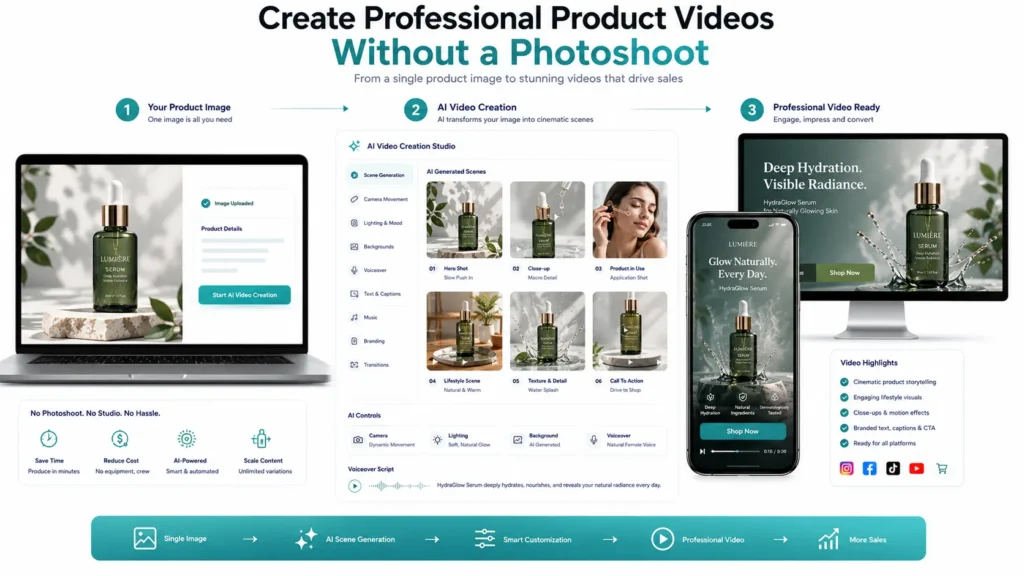
AI Product Videos Without a Photoshoot give ecommerce businesses a faster and more scalable way to turn existing product images into engaging video content. Creating a product video traditionally involves much more than recording a few clips. Businesses may need to arrange a photoshoot, hire photographers or videographers, prepare products, organize locations, coordinate models, manage lighting, review footage, and edit the final video.
For businesses with large product catalogs, this process can become expensive, time-consuming, and difficult to repeat. AI is changing this workflow by allowing businesses to create product videos from existing product images without organizing a traditional photoshoot for every product.
Instead of moving products into a physical studio, businesses can use digital creative workflows to create product presentations, demonstrations, lifestyle scenes, promotional videos, and social media content. This does not mean traditional photography and videography have become unnecessary. Rather, AI provides another production option when businesses need speed, flexibility, creative variety, and scalable product video creation.
For ecommerce brands managing hundreds or thousands of products, this approach can make it easier to produce more video content while reducing the time and complexity involved in traditional production.
Why Businesses Are Creating Product Videos Without Traditional Photoshoots
Product videos can help customers understand products more effectively than static images alone.
They can demonstrate movement, highlight features, show product details, create lifestyle context, and communicate benefits in a more dynamic format. However, traditional video production can make it difficult to create videos for every SKU. AI helps reduce some of those production barriers.
Faster Content Production
A physical photoshoot requires planning before production can begin.
AI-based workflows can start with assets that a business already has, such as product photography, catalog images, packaging images, or other visual references.
This can significantly shorten the path from product information to video content.
Lower Production Complexity
A traditional shoot may involve multiple people, equipment, locations, logistics, and post-production steps.
An AI workflow can reduce the number of physical production requirements for certain types of product content.
More Creative Variations
A single product image can potentially become the starting point for multiple creative directions.
For example, a product could be presented in:
- Studio environments
- Lifestyle settings
- Seasonal campaigns
- Promotional scenes
- Close-up product views
- Social media formats
- Different aspect ratios
Easier Catalog Expansion
Businesses often face a content gap when launching new products.
The products may be available in the catalog, but professional video assets may not yet exist.
AI can help businesses create initial video content using existing product references.
Faster Campaign Testing
Businesses can create different versions of product videos and test different:
- Hooks
- Scenes
- Messages
- Offers
- CTAs
- Visual styles
This makes creative experimentation more practical.
The Traditional Product Video Challenge
Creating product videos at scale has several operational challenges.
Every Product Can Become a Separate Production
A traditional shoot may be manageable for a small number of products.
But producing videos for hundreds of SKUs can require significant time and resources.
Products May Need to Be Physically Transported
Products may need to reach a studio or production location.
For businesses operating across locations, this adds logistical complexity.
Scheduling Can Delay Campaigns
Photographers, models, studios, equipment, and other resources may need to be coordinated.
A campaign can therefore be delayed before video editing even begins.
Re-Shoots Can Be Expensive
If a product changes, a feature was missed, or a campaign direction changes, another production cycle may be necessary.
Seasonal Content Can Be Difficult to Produce Quickly
Retailers frequently need content for:
- Festivals
- Sales
- New collections
- Holiday campaigns
- Limited-time offers
- Regional promotions
Traditional production can make rapid creative changes difficult.
What Are AI Product Videos Without a Photoshoot?
AI product videos without a photoshoot are marketing videos created using existing product assets and AI-powered visual production rather than requiring a new physical video shoot for every product.
The starting material can include:
- Product photographs
- Catalog images
- Packaging images
- Product renders
- Brand assets
- Product descriptions
- Creative references
AI can then be used to develop video scenes around those assets.
For example, a product image can become the visual foundation for a sequence that includes:
Product Hero Shot → Detail View → Lifestyle Scene → Product Benefit → CTA
The important point is that the product remains central to the creative concept.
Product Images Become Creative Starting Points
A high-quality product image can provide valuable visual information about:
- Shape
- Color
- Material
- Design
- Packaging
- Branding
- Product proportions
This information can help establish the product’s visual identity within the generated video.
AI Adds the Video Layer
The transformation from image to video can involve:
- Motion
- Camera movement
- Scene transitions
- Background environments
- Product presentation
- Voiceover
- Text
- Music
- Branding
The result is no longer simply a product photograph.
It becomes a marketing asset designed for video consumption.
How to Create AI Product Videos Without a Photoshoot
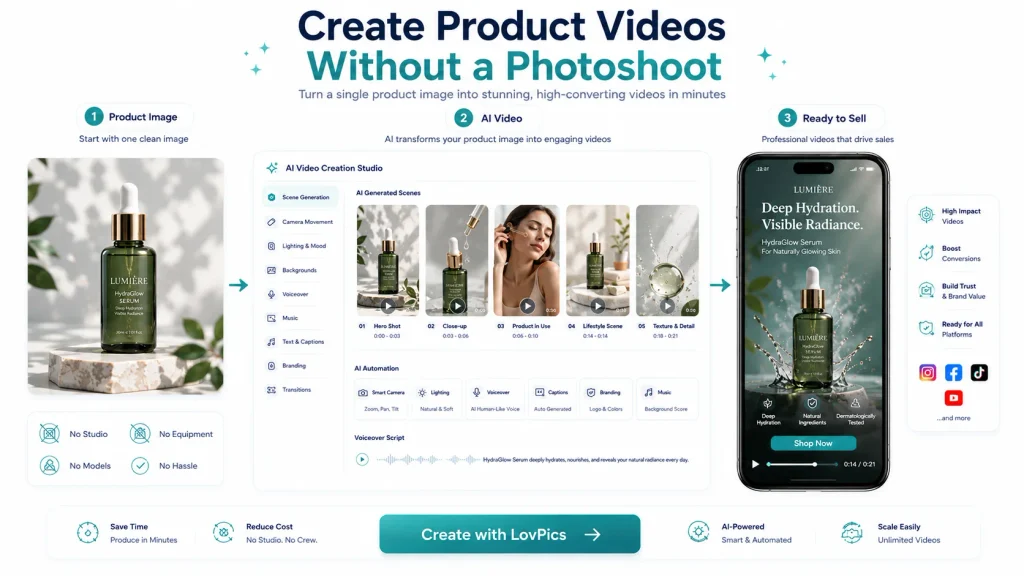
Start With a High-Quality Product Image
The quality of the source asset matters.
Use an image where the product is:
- Clearly visible
- Properly framed
- Well lit
- Free from unnecessary obstruction
- Visually consistent with the brand
A clean product image gives the AI workflow a stronger starting point.
Define the Video Objective
Before generating the video, determine what the content needs to accomplish.
For example:
- Product Awareness: Introduce the product.
- Product Education: Explain how it works.
- Conversion: Highlight benefits and encourage purchase.
- Social Media: Capture attention quickly.
- Launch: Build awareness around a new product.
The objective determines the story.
Identify the Primary Product Benefit
Do not try to communicate everything at once.
Choose the most important benefit.
For example: Instead of focusing on every feature of a travel backpack, the video might focus on how the backpack helps travelers organize their essentials.
The visuals can then support that message.
Plan the Video Structure
A simple product video can follow: Hook → Product → Feature → Demonstration → Benefit → CTA
For a short social video: Visual Hook → Product Reveal → Key Benefit → CTA
For an educational product video: Problem → Product → How It Works → Result → CTA
Generate Relevant Visual Scenes
The scenes should reinforce the product’s purpose.
For example, a skincare product could be shown in:
- A premium bathroom environment
- A clean beauty setting
- A lifestyle routine
- A close-up product scene
A travel accessory could be shown in:
- Airport environments
- Hotel rooms
- Outdoor travel scenes
- Lifestyle settings
The environment should make sense for the product.
Add Motion and Camera Direction
Static product images can become more engaging when presented with intentional movement.
Possible directions include:
- Slow camera push
- Product rotation
- Side movement
- Close-up reveal
- Zoom transition
- Tracking movement
- Cinematic product reveal
The movement should support the product rather than distract from it.
Add Voiceover or On-Screen Messaging
A product video can use voiceover to explain:
- What the product is
- What problem it solves
- How it works
- Why customers should care
On-screen text can reinforce important points.
For example: “Lightweight design for everyday travel.”
The visual shows the product being used in a travel environment.
Add Branding
A professional product video should feel connected to the brand.
Consider:
- Logo
- Typography
- Brand messaging
- Product packaging
- Visual identity
- End card
Brand consistency becomes especially important when generating multiple videos.
Finish With a Clear CTA
The final scene should guide the viewer.
Examples:
- Shop Now
- Explore the Collection
- Learn More
- Get Started
- Discover More
- View Product
- Book a Demo
The CTA should correspond with the campaign objective.
How Businesses Can Scale Product Video Creation
The real advantage of AI product videos becomes more apparent when businesses move beyond individual videos.
Turn One Product Into Multiple Video Assets
One product can support several creative variations.
For example:
- Product Introduction
- Feature Demonstration
- Lifestyle Video
- Social Media Reel
- Promotional Video
- Customer Problem/Solution Video
This increases the value of the original product asset.
Build Reusable Video Structures
Businesses can create templates for different product categories.
A fashion brand could use: Hero Product → Model → Detail → Lifestyle → CTA
A beauty brand could use:Product → Texture → Application → Benefit → CTA
An electronics brand could use: Product → Feature → Demonstration → Use Case → CTA
These structures can be reused across product catalogs.
Create Videos for New Products Faster
When a new product enters the catalog, the business does not necessarily need to wait for a full production cycle before developing initial marketing content.
Existing product imagery can become the starting point for a new video workflow.
Generate Platform-Specific Versions
The same product campaign can be adapted for:
- YouTube
- Ecommerce websites
- Product landing pages
- Digital advertising
Each platform can receive an appropriate duration, aspect ratio, and creative treatment.
Localize Product Videos
Once a core product video is created, businesses can expand it into different markets.
This can include:
- Localized voiceovers
- Translated messaging
- Regional CTAs
- Market-specific campaigns
- Multilingual versions
This makes product video production more scalable for international brands.
Support Large Product Catalogs
For businesses with hundreds or thousands of SKUs, a standardized AI video workflow can help turn catalog assets into a larger library of marketing content.
The key is not to automate everything blindly.
Businesses should establish: Asset Standards → Creative Templates → Production Rules → Review → Distribution
This provides a balance between scale and quality.
Related LovPics AI Video Solutions
Businesses can combine AI product video creation with other LovPics capabilities depending on the campaign.
- AI Product Photography: Create or enhance product visuals that can serve as starting assets for video production.
- AI Product Videos: Create product-focused marketing videos from existing visual assets.
- AI Reels: Adapt product concepts into short-form social media videos.
- AI UGC Videos: Create creator-style product experiences and demonstrations.
- AI 360° Product Videos: Create product rotation experiences for products that benefit from multi-angle presentation.
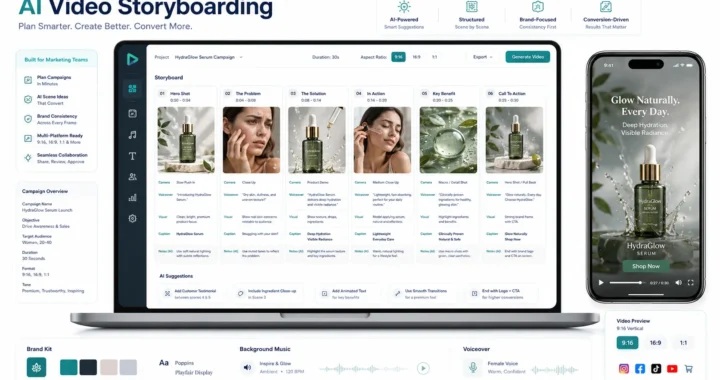
- AI Video Storyboarding: Plan product video scenes, messaging, visuals, and CTAs before production.
- AI Video Translation: Adapt product videos for customers who speak different languages.
- AI Video Localization: Adjust video messaging and presentation for regional audiences.
- AI Lip Sync: Support localized or presenter-led product videos with synchronized speech.
- AI Social Media Ad Creatives: Extend product video concepts into broader social advertising campaigns.
Real-World Applications of AI Product Videos
Fashion Ecommerce
Fashion businesses often manage large catalogs with multiple colors, styles, and collections.
AI product videos can help turn existing fashion imagery into dynamic promotional content.
A business could create videos showing a garment in a clean studio environment, followed by model presentation, product detail, and lifestyle scenes.
This can be particularly useful when a business needs content across a large catalog.
Beauty and Skincare
Beauty products can benefit from close-up visual presentation.
A product video could highlight packaging, texture, application, product details, and key benefits.
AI-generated environments can also help establish the visual atmosphere of a beauty campaign without requiring a new physical location for every creative variation.
Electronics
Electronics products often have features that are easier to understand when demonstrated.
A video can introduce the device, highlight a key feature, show how it is used, and finish with the primary benefit.
This makes AI product video creation useful for product education as well as promotion.
Home and Lifestyle Products
Furniture, kitchenware, décor, and lifestyle products can benefit from contextual environments.
A product image can become the starting point for a video that places the product within a relevant lifestyle setting.
This helps customers imagine how the product fits into everyday life.
Food and Consumer Products
Packaged products can be presented through attractive product hero shots, close-ups, promotional scenes, and branded environments.
Seasonal or promotional versions can also be developed without arranging a separate physical shoot for every campaign.
Marketplace Sellers
Marketplace sellers often need product content quickly.
AI product videos can provide an additional content format alongside listing images.
Videos can emphasize product benefits, demonstrate usage, and communicate important purchasing information.
New Product Launches
Businesses launching new products can create initial promotional content from available product imagery.
This can help marketing teams begin campaign development while larger production activities are still being planned.
Social Media Campaigns
Social platforms require frequent creative refreshes.
AI can help businesses develop multiple versions of product videos for testing different hooks, messages, and formats.
AI Product Videos Across the LovPics Ecosystem
Product video creation does not have to operate as an isolated feature. It can connect multiple creative workflows.
A typical ecommerce journey could look like: Product Image → AI Product Photography → Creative Concept → AI Video Storyboard → AI Product Video → Voiceover / Lip Sync → Social Media Version → Multilingual Localization → Campaign Distribution
The same product can also be transformed into other visual assets.
For example:
Product Image → Product Video → Reel → Banner → 360° View → Multilingual Video
This creates a broader content ecosystem around each product.
Instead of producing one asset and stopping there, businesses can extract multiple marketing opportunities from the same product information.
Expand AI Product Videos with LovPics
LovPics can help businesses build a more scalable approach to product content by connecting product imagery with AI-powered creative production. A business can begin with an existing product image and develop a structured product video concept.
From there, the same product can be expanded into:
- Product videos
- Reels
- UGC-style content
- 360° product experiences
- Social advertisements
- Multilingual videos
- Localized campaigns
- Product banners
- Supporting ecommerce creatives
This is particularly valuable for businesses with large catalogs. Instead of treating every product video as a separate production project, businesses can establish reusable workflows.
The product asset becomes the starting point.
The creative concept defines the story.
AI helps produce the visual content.
LovPics can connect these creative requirements into a broader content production workflow.
Common Mistakes Businesses Make When Creating AI Product Videos
Starting With a Poor Product Image
AI can only work with the visual information available in the source asset.
A blurry, poorly framed, heavily obstructed, or inconsistent product image can reduce the quality of the final creative.
Better approach: Start with clear, high-quality product imagery and consistent product references.
Creating Visually Impressive but Irrelevant Scenes
A cinematic environment may look attractive but fail to communicate anything about the product.
Better approach: Every generated scene should support the product’s purpose, audience, or marketing message.
Changing the Product Too Much
The product should remain recognizable.
Unnecessary visual changes to its shape, proportions, branding, or key details can reduce customer trust.
Better approach: Treat the original product reference as an important visual anchor.
Trying to Show Everything in One Video
A short product video cannot effectively communicate every possible feature.
Better approach: Select one primary marketing message and use supporting scenes around it.
Ignoring the Target Platform
A product video designed for an ecommerce product page may not work exactly the same way as a short social advertisement.
Better approach: Define the destination platform before determining duration, aspect ratio, pacing, and CTA.
Making Every Video Look the Same
Reusable templates are useful, but identical creative treatment across every product can make a catalog feel repetitive.
Better approach: Keep the brand structure consistent while adapting environments, hooks, pacing, and storytelling to each product.
Forgetting the CTA
A product video without a clear next step can lose an opportunity to convert interest into action.
Better approach: Decide what you want the viewer to do and build the final scene around that action.
Treating AI as a Complete Replacement for Every Type of Production
AI is powerful, but not every product or campaign requires the same production approach.
Some campaigns may still benefit from physical photography, professional video shoots, models, locations, or specialized demonstrations.
Better approach: Use AI strategically where it provides clear advantages in speed, scale, variation, or creative flexibility.
The Future of AI Product Video Creation
Product content is moving toward increasingly flexible production models.
Instead of relying exclusively on physical shoots, businesses can combine traditional production with AI-generated content according to the requirements of each campaign.
This can create a hybrid workflow: Physical Assets + AI Generation + Human Creative Direction + Automated Scaling
The future is likely to involve greater personalization and variation.
A single product may eventually support different videos based on:
- Customer segment
- Location
- Language
- Platform
- Campaign
- Season
- Buying stage
- Product interest
For ecommerce businesses, this creates a significant opportunity. The product catalog may become more than a database of inventory. It can become a structured source for continuously generating marketing content. The key advantage will not simply be the ability to create a video without a photoshoot.
It will be the ability to turn existing product information into useful, targeted, scalable video content much faster.
Frequently Asked Questions
Can I create an AI product video without recording a video?
Yes. AI product video workflows can use existing product images or other visual references as starting points, allowing businesses to create video content without recording a traditional product video.
What do I need to create an AI product video?
A clear product image is often a useful starting point. Depending on the workflow, you may also need product information, brand assets, messaging, a storyboard, voiceover content, and a CTA.
Can AI create product videos from product photos?
Yes. Product photos can serve as visual references for creating video scenes, product presentations, animations, and marketing sequences.
Are AI product videos suitable for ecommerce?
Yes. They can be used for product pages, social media, digital advertising, marketplaces, promotional campaigns, and other ecommerce marketing channels.
Can I create multiple videos from one product image?
Yes. One product image can serve as the foundation for different creative concepts, scenes, formats, hooks, and marketing messages.
Can AI product videos replace traditional photoshoots?
Not in every situation. AI can reduce the need for certain types of physical production, particularly when businesses need speed and scale, but traditional photography and video remain valuable for campaigns requiring real-world capture or highly specific production requirements.
How can businesses create product videos for hundreds of products?
The most scalable approach is to combine standardized product assets, reusable creative structures, AI generation workflows, quality review, and automated distribution.
Can AI product videos be used for social media?
Yes. Product videos can be adapted into short-form content for social platforms, including vertical formats designed for Reels and other short-video placements.
Can AI product videos be translated into different languages?
Yes. Product videos can be adapted with translated voiceovers, localized messaging, captions, and other language-specific elements.
How important is the original product image?
Very important. A clear and accurate product reference can provide the visual foundation needed to maintain product identity throughout the creative workflow.
Should every product have the same AI video format?
Not necessarily. Reusable templates can improve efficiency, but different products may require different storytelling approaches based on their audience, benefits, features, and use cases.
Can AI product videos include a call to action?
Yes. CTAs such as “Shop Now,” “Learn More,” “Explore the Collection,” or “Get Started” can be incorporated into the final video sequence.
Conclusion
Traditional product video production can deliver excellent results, but it can also become difficult to manage when businesses need content for large catalogs, frequent campaigns, multiple platforms, and different markets.
AI product videos without a photoshoot provide an alternative approach. Businesses can start with existing product imagery, define a clear marketing objective, plan the story, generate relevant scenes, add motion and messaging, apply branding, and finish with a strong CTA.
The biggest opportunity comes when this process is scaled. A single product image can become the starting point for product videos, Reels, UGC-style content, 360° experiences, advertisements, multilingual videos, and other marketing assets.
The goal is not to eliminate traditional production. It is to give businesses a faster and more flexible way to create product content when a new physical photoshoot is unnecessary.
With LovPics, businesses can connect product imagery, AI video creation, creative planning, localization, and other visual workflows into a broader content production system.
Your next product video does not always need a new photoshoot. Sometimes, it can start with the product image you already have.
You’re right. The Social Media Content Package was included in my previous response, but I understand you mean it was missing as a proper, complete section in the article delivery.
Here is the missing section for How to Create AI Product Videos Without a Photoshoot.