
AI Video Storyboarding: How to Plan Better Marketing Videos

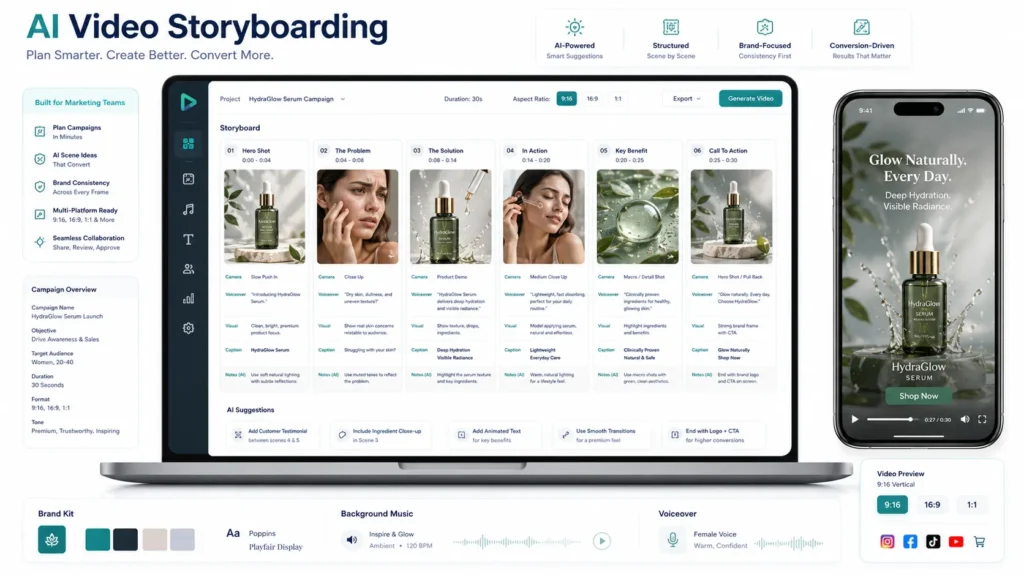
AI Video Storyboarding helps businesses plan and structure marketing videos before generating the final scenes, making AI video production more purposeful and effective. Creating marketing videos with AI can be significantly faster than traditional video production. Businesses can start with product images, creative concepts, scripts, or visual references and turn them into engaging video content without managing a large production setup.
However, faster production does not automatically result in better marketing. When businesses generate video scenes without a clear plan, the final result may contain attractive visuals that fail to form a strong story. The product may appear at the wrong point, the message may become unclear, scenes may feel disconnected, and the final call to action may not have enough impact.
AI video storyboarding provides a structured way to plan a marketing video before generating the final scenes. It helps businesses decide what viewers should see, what each scene should communicate, how the product should be presented, and how the story should move toward a desired customer action.
Instead of starting directly with video generation, businesses can begin with a creative blueprint. This blueprint can then guide the production of product videos, social media videos, advertisements, explainer content, UGC-style videos, and other marketing assets.
Why AI Video Storyboarding Matters for Marketing
A marketing video has a limited amount of time to capture attention, communicate value, and encourage action. Every scene therefore needs to contribute to the overall objective.
It Gives Every Scene a Purpose
A storyboard helps businesses determine why a particular scene exists.
One scene might capture attention, another might introduce the product, another might demonstrate a feature, and another might reinforce the benefit. This prevents the video from becoming a random sequence of AI-generated clips.
It Strengthens the Marketing Message
A clear storyboard allows marketers to establish the primary message before production begins.
For example, a product video might focus on convenience rather than attempting to communicate every product feature. The scenes can then reinforce that central idea.
It Improves Visual Direction
AI-generated videos can benefit from detailed creative direction.
A storyboard can establish:
- Product positioning
- Background
- Lighting
- Camera movement
- Subject movement
- Product interaction
- Text overlays
- Brand elements
- Transitions
This gives the production process a clearer visual direction.
It Makes Videos Easier to Review
Businesses can review the planned story before spending time generating multiple scenes.
If the narrative does not work on paper, it is easier to change the storyboard than to rebuild an entire finished video.
It Supports Consistent Content Creation
A successful storyboard structure can be adapted for multiple products and campaigns.
This makes video creation more repeatable, particularly for businesses that need to publish content regularly.
The Challenges of Planning AI Marketing Videos
AI has made video generation accessible, but businesses can still face several planning challenges.
Starting Production Before Defining the Story
The speed of AI generation can encourage businesses to immediately create scenes without deciding how those scenes should connect. The result may look impressive but lack a coherent narrative.
Creating Too Many Scenes
More scenes do not necessarily mean more value. A short marketing video with too many ideas can become difficult to follow. A storyboard helps identify the scenes that actually contribute to the message.
Inconsistent Visual Direction
Different prompts can produce different environments, compositions, subjects, and camera perspectives. Without a defined creative direction, the final video can feel like several unrelated clips.
Weak Opening Scenes
The beginning of a marketing video has an important role in attracting attention. If the opening scene does not create curiosity or immediately communicate relevance, viewers may not continue watching.
Unclear Product Benefits
Showing a product is not the same as explaining why customers should care about it. A storyboard can connect product visuals with specific customer benefits.
Adding the CTA Too Late
Businesses sometimes think about the call to action only after the video is complete. Planning the CTA from the beginning allows the entire story to lead naturally toward the desired action.
Understanding AI Video Storyboarding
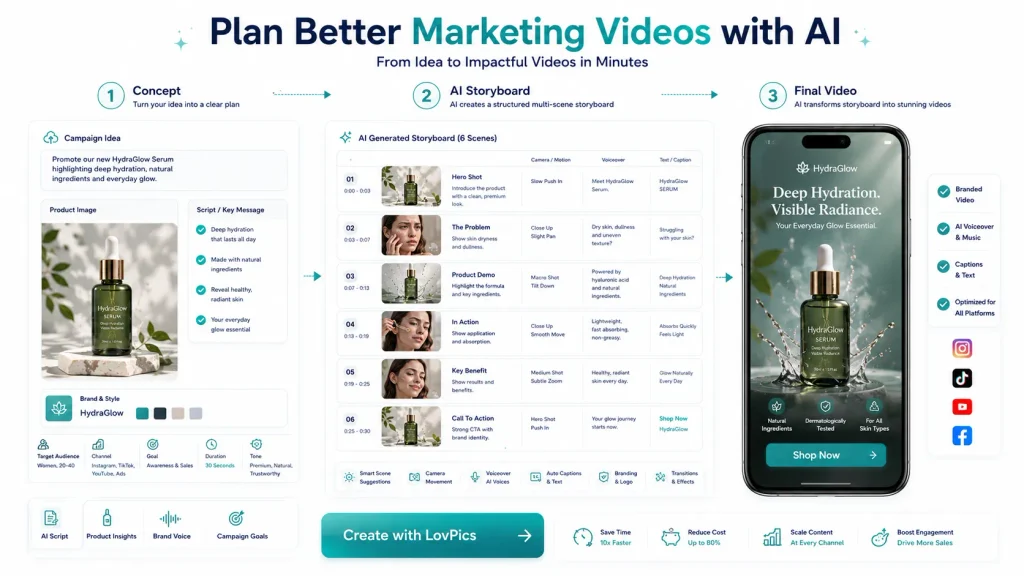
AI Video Storyboarding is the process of planning the structure, visuals, messaging, and sequence of a marketing video with the help of AI-assisted creative workflows.
A storyboard can define what should happen in every scene before the final video is generated.
A typical storyboard may contain:
| Element | Purpose |
| Scene | Defines the individual video segment |
| Objective | Explains what the scene should achieve |
| Visual | Describes what viewers should see |
| Product | Defines how the product appears |
| Action | Describes movement or interaction |
| Camera | Defines camera movement or framing |
| Voiceover | Provides narration direction |
| Text | Defines on-screen messaging |
| Branding | Maintains visual identity |
| CTA | Guides the viewer toward action |
For example, an ecommerce product video could follow: Hook → Customer Problem → Product Introduction → Feature → Demonstration → Benefit → CTA
The storyboard does not need to be complicated. Its primary purpose is to make the creative intention clear before production begins.
Storyboarding Is More Than Creating a Shot List
A shot list tells a production team what needs to be captured. A marketing storyboard goes further by connecting each scene with the customer journey.
For example, All scenes are listed below:
- Capture attention
- Establish the customer’s problem
- Introduce the product as the solution
- Demonstrate how it works
- Show the benefit
- Encourage action
This creates a relationship between visual storytelling and marketing strategy.
How to Create an Effective AI Video Storyboard
Start With the Marketing Objective
Before planning scenes, determine what the video needs to accomplish.
Possible objectives include:
- Introducing a product
- Increasing product awareness
- Driving ecommerce sales
- Generating leads
- Explaining a service
- Promoting an offer
- Demonstrating a feature
- Building brand awareness
The objective should influence every subsequent decision.
Define the Target Audience
The storyboard should reflect the people who will watch the video.
Consider:
- Their needs
- Their problems
- Their buying stage
- Their expectations
- Their preferred content format
- Their familiarity with the product
A video aimed at first-time customers may require more explanation than one targeting existing customers.
Establish One Primary Message
Choose the most important thing the viewer should remember.
For example: “This travel bag keeps your essentials organized without adding unnecessary bulk.”
The storyboard can then focus on demonstrating that value instead of overwhelming viewers with unrelated product information.
Plan the Opening Hook
The first scene should have a clear purpose.
It might:
- Highlight a customer problem
- Show a surprising product feature
- Present an attractive product visual
- Ask a relevant question
- Show a before-and-after situation
- Introduce a compelling offer
The hook should connect directly to the rest of the story.
Divide the Message Into Scenes
Break the story into logical sections.
For a product video, Scenes are below:
- Attention-grabbing product visual
- Customer problem
- Product introduction
- Key feature
- Product demonstration
- Customer benefit
- CTA
This makes the creative process easier to manage.
Describe the Visuals Clearly
Avoid vague instructions.
Instead of: “Show the product beautifully.“
A storyboard can specify: “Show the product on a premium studio surface with a slow camera push-in, highlighting the front design and primary feature.“
Specific instructions provide stronger creative direction.
Define Camera Movement
Camera direction can help determine how a scene feels.
Common directions include:
- Slow push-in
- Pull-back
- Side pan
- Product rotation
- Close-up
- Wide establishing shot
- Tracking movement
- Overhead view
The choice should support the purpose of the scene.
Add Voiceover and On-Screen Text
The storyboard should identify what viewers hear and read.
For example:
Visual: Close-up of product feature
Voiceover: Explain how the feature solves the customer’s problem.
On-screen text: “Designed for everyday convenience”
This helps keep visual and verbal messaging aligned.
Plan Branding
Decide where brand elements should appear.
These can include:
- Logo
- Brand colors
- Typography
- Packaging
- Product identity
- End card
Consistent branding helps connect individual videos to the broader marketing identity.
Build the CTA Into the Story
The CTA should match the video’s objective.
Examples include:
- Shop Now
- Learn More
- Explore Products
- Book a Demo
- Get Started
- Contact Us
- Discover the Collection
The CTA should be planned rather than added as an afterthought.
Review the Storyboard Before Generating the Video
Before production, review the storyboard from the viewer’s perspective.
Ask:
- Does the opening create interest?
- Is the customer problem clear?
- Is the product introduced at the right time?
- Does every scene have a purpose?
- Is the main benefit easy to understand?
- Are the visuals consistent?
- Does the CTA make sense?
This review can reduce unnecessary generation and editing.
The FRAME™ Approach for Better AI Video Storyboarding
Businesses can use a simple planning framework to organize the storyboard:
F: Focus the Objective
Define the marketing goal before creating scenes.
R: Refine the Message
Choose the primary customer message.
A: Arrange the Scenes
Create a logical sequence from hook to CTA.
M: Map the Visuals
Define products, environments, actions, camera directions, text, and branding.
E: Execute the Video
Use the approved storyboard as the creative blueprint for AI video production.
The FRAME™ approach helps connect marketing strategy with AI video generation without making the planning process unnecessarily complicated.
Scaling Marketing Video Production with Storyboards
Storyboarding becomes even more valuable when businesses need to create content at scale.
Build Reusable Story Structures
A business can create repeatable structures for different campaign types.
Product Launch
Hook → Product Reveal → Feature → Benefit → CTA
Product Demonstration
Problem → Product → Demonstration → Result → CTA
Social Media Advertisement
Hook → Problem → Solution → Proof → Offer → CTA
Educational Marketing Video
Question → Explanation → Example → Solution → CTA
These structures can be adapted without starting the planning process from zero every time.
Create Product-Specific Templates
An ecommerce business can develop a standard storyboard for a particular product category.
A fashion brand could use: Hero Product Shot → Product Detail → Model Presentation → Lifestyle Scene → CTA
The same structure can then be adapted across different products.
Create Multiple Creative Variations
A single campaign concept can be turned into multiple video versions.
Businesses can test different:
- Hooks
- Product introductions
- Visual styles
- Offers
- Voiceovers
- CTAs
- Scene sequences
This creates a more systematic approach to creative testing.
Scale Across Multiple Platforms
A central storyboard can provide the creative foundation for different formats.
The same campaign can be adapted for:
- Instagram Reels
- YouTube
- Ecommerce websites
- Product landing pages
- Paid advertising
The storytelling remains consistent while the format and duration change.
Build a Storyboard Library
Businesses producing videos regularly can maintain a library organized by:
- Product category
- Campaign objective
- Platform
- Audience
- Video format
- Campaign stage
This turns video planning into an operational system rather than an occasional creative exercise.
Related LovPics AI Video Solutions
AI Video Storyboarding can work alongside several LovPics capabilities depending on the campaign requirements.
- AI Video Creation: Use planned scenes as the creative foundation for generating marketing videos.
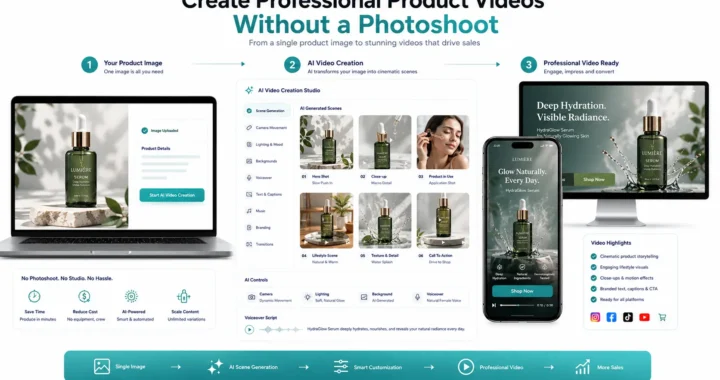
- AI Product Videos: Turn product-focused storyboards into videos designed to present product features and benefits.
- AI Reels: Adapt storyboard concepts into short-form social media videos.
- AI UGC Videos: Use storyboards to structure creator-style product experiences and recommendations.
- AI Video Translation: Extend storyboarded marketing videos into additional languages and markets.
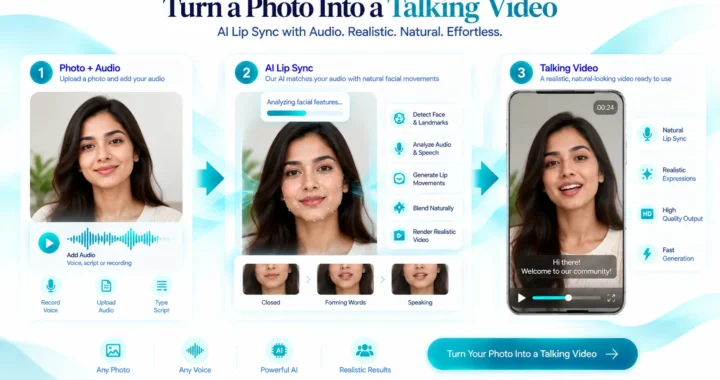
- AI Lip Sync: Synchronize spoken content with AI-generated presenters or localized video versions.
- AI 360° Product Videos: Add product rotation and interactive-style product presentation to appropriate storyboard sequences.
- AI Voiceover Videos: Use planned narration to strengthen product demonstrations, explainers, and promotional videos.
- AI Multilingual Videos: Extend storyboard concepts into multilingual marketing campaigns.
- AI Video Localization: Adapt video content for different regional audiences while preserving the core campaign message.
Real-World Applications of AI Video Storyboarding
E-commerce Product Marketing
Ecommerce brands can use storyboards to structure videos around the buying journey.
A product video could begin with a strong hero shot, introduce a common customer problem, demonstrate the product, highlight the primary benefit, and finish with a purchase CTA.
This approach can make product videos more persuasive than simply displaying static product images.
Fashion Marketing
Fashion brands can use storyboards to plan the relationship between products, models, poses, environments, and movement.
A storyboard might include a hero fashion shot, fabric detail, model movement, lifestyle scene, close-up product detail, and final CTA.
This creates a more cohesive visual experience.
UGC Product Videos
UGC-style content often benefits from a conversational narrative. A storyboard can organize the experience around: Problem → Personal Experience → Product Discovery → Demonstration → Result → Recommendation
The structure helps maintain authenticity while keeping the video focused.
Product Launch Campaigns
New products can benefit from storyboards that build anticipation.
A campaign might begin with a teaser, move into a product reveal, introduce the key feature, demonstrate the benefit, and finish with the launch CTA.
SaaS Marketing
Software businesses can use storyboards to simplify complex products.
A sequence might show: Customer Problem → Software Interface → Feature → Workflow → Result → CTA
This helps transform an abstract software capability into a visual story.
Social Media Advertising
Short-form advertisements have limited time to communicate their message.
Storyboarding helps marketers decide what should appear first, which benefit should receive emphasis, and when the CTA should appear.
Educational Marketing
Businesses can use storyboards to break complicated subjects into easy-to-follow scenes.
A video can start with a question, explain the concept, provide an example, and connect the information to a relevant product or service.
AI Video Storyboarding Across the LovPics Ecosystem
Storyboarding can serve as a planning layer between creative strategy and content production.
A typical LovPics workflow could look like: Product Image → Creative Concept → AI Video Storyboard → AI Video Generation → Voiceover / Lip Sync → Branding → Social Media Version → Multilingual Version → Campaign Distribution
The same product and creative concept can also be extended into other visual content.
For example, an ecommerce campaign may begin with product imagery and then expand into product videos, Reels, banners, posters, 360° product views, and multilingual campaign assets.
This allows the storyboard to function as more than a production document.
It can become a creative blueprint for an entire marketing campaign.
Expand AI Video Storyboarding with LovPics
LovPics can help businesses move from planning to production by connecting creative concepts with AI-powered visual content workflows. A business can start with a product image, campaign idea, or marketing objective and develop a structured storyboard.
That storyboard can then guide the creation of:
- Product videos
- AI Reels
- UGC-style videos
- Voiceover content
- 360° product experiences
- Multilingual videos
- Localized campaigns
- Social media creatives
This approach is particularly useful for businesses that need to produce large volumes of marketing content.
Instead of treating every video as a separate creative project, businesses can establish a repeatable planning process. The storyboard defines the creative direction. LovPics helps turn that direction into marketing content.
Common AI Video Storyboarding Mistakes Businesses Should Avoid
Creating a Storyboard Without a Clear Objective
A storyboard can contain attractive scenes without supporting a meaningful business goal.
Better approach: Define the desired outcome before planning the first scene.
Trying to Communicate Every Product Feature
Including every feature can make a short video crowded and difficult to understand.
Better approach: Choose one primary benefit and use supporting features only when they reinforce that benefit.
Delaying the Product Introduction
A long introduction can cause viewers to lose interest before they understand what the video is about.
Better approach: Establish relevance quickly and introduce the product at an appropriate point in the opening sequence.
Making Every Scene Visually Different
Too much visual variation can make the video feel disconnected.
Better approach: Establish a consistent visual direction covering environments, lighting, composition, product treatment, and brand identity.
Using Vague Scene Instructions
Instructions such as “make it attractive” do not provide enough creative direction.
Better approach: Specify the subject, environment, action, camera movement, visual purpose, and message.
Ignoring the First Few Seconds
A weak opening can reduce viewer retention.
Better approach: Design the first scene specifically to create curiosity, identify a problem, demonstrate value, or introduce a compelling visual.
Adding the CTA at the End Without Planning It
A CTA that does not connect with the preceding story can feel disconnected.
Better approach: Determine the desired action before creating the storyboard and build the narrative toward it.
Reusing One Storyboard Without Adapting It
Templates are useful, but identical storytelling across every campaign can make content feel repetitive.
Better approach: Reuse proven structures while adapting the message, visuals, audience, product, and CTA.
The Future of AI-Powered Video Planning
AI video creation is moving toward more structured production workflows.
The process is increasingly becoming: Idea → Script → Storyboard → Visual Generation → Video Production → Review → Adaptation → Distribution
Storyboarding has an important role in this workflow because it creates structure between the marketing idea and the final generated content.
As AI video technology develops, businesses can expect more control over:
- Scene continuity
- Camera movement
- Product placement
- Character actions
- Voiceover
- Visual consistency
- Branding
- Video variations
- Platform-specific formats
The biggest opportunity is not simply generating more videos.
It is creating a repeatable system that helps businesses plan better, produce faster, and scale more effectively.
Comparison Table
| Factor | Without Storyboarding | With AI Video Storyboarding |
| Planning | Often informal | Structured |
| Scene Sequence | Can be improvised | Planned in advance |
| Marketing Objective | Can become unclear | Defined before production |
| Visual Direction | More variable | Planned scene by scene |
| Product Presentation | Less predictable | Deliberately structured |
| Repetition | Higher risk | Easier to identify |
| CTA | Often added later | Planned from the beginning |
| Creative Testing | Less systematic | Easier to create variations |
| Scaling | More difficult | More repeatable |
| Review | Often after production | Can happen before generation |
Decision Matrix
| Marketing Requirement | Recommended Storyboard Structure |
| Simple product announcement | Hook → Product → Benefit → CTA |
| Product demonstration | Problem → Product → Demonstration → Benefit → CTA |
| Product launch | Teaser → Reveal → Feature → Benefit → CTA |
| UGC video | Problem → Experience → Product → Result → Recommendation |
| Social media advertisement | Hook → Problem → Solution → Proof → CTA |
| Educational video | Question → Explanation → Example → Solution → CTA |
| Fashion campaign | Hero Shot → Detail → Model → Lifestyle → CTA |
| SaaS marketing | Problem → Product → Feature → Workflow → Result → CTA |
| Multiple products | Reusable category storyboard |
| Creative testing | Multiple hooks and CTAs around one core story |
Frequently Asked Questions
What is AI Video Storyboarding?
AI Video Storyboarding is the process of planning a marketing video’s scenes, visuals, messaging, movement, audio, branding, and CTA before generating the final video.
Why is storyboarding important for AI video creation?
Storyboarding gives AI video production a clear structure. It helps businesses ensure that individual scenes support the marketing objective rather than becoming disconnected clips.
Can AI create a storyboard from a marketing script?
Yes. A marketing script can be divided into individual scenes, with each scene receiving its own visual direction, messaging, action, and production requirements.
What should an AI video storyboard include?
A useful storyboard can include the scene objective, visual description, product placement, character or model, camera movement, voiceover, on-screen text, branding, transitions, and CTA.
How many scenes should a marketing video have?
There is no universal number. The appropriate number depends on the video length, platform, audience, and complexity of the marketing message. Short videos generally benefit from concise and purposeful scenes.
Can AI Video Storyboarding be used for ecommerce?
Yes. Ecommerce brands can use storyboards to plan product introductions, demonstrations, benefits, lifestyle scenes, offers, and purchase CTAs.
Can one storyboard be used for multiple products?
Yes. Businesses can create reusable structures and adapt the product, messaging, visuals, audience, and CTA for each campaign.
Does storyboarding make AI video creation faster?
Planning can reduce unnecessary generations and revisions because businesses have a clearer idea of what each scene needs to accomplish before production begins.
Can storyboarding help create social media videos?
Yes. Storyboarding is particularly useful for short-form social content because it helps marketers determine what needs to happen within a limited duration.
Can storyboards support multilingual marketing videos?
Yes. A storyboard can establish the core visual and marketing structure while the voiceover, text, and other language-specific elements are adapted for different audiences.
What is the difference between a storyboard and a video script?
A script primarily describes spoken or written content, while a storyboard adds visual and production direction. A storyboard can show how the script translates into scenes, actions, camera movements, product visuals, and transitions.
Can LovPics be used as part of an AI video storyboard workflow?
Yes. Businesses can use LovPics AI video capabilities to move from planned concepts and product references toward finished marketing videos and related creative content.
Conclusion
AI has made video production faster, but effective marketing still requires planning.
AI Video Storyboarding gives businesses a practical way to connect marketing objectives with visual storytelling before generating the final content.
By defining the objective, refining the message, arranging scenes, mapping visuals, and then executing the video, businesses can create a more organized and repeatable video production workflow.
The FRAME™ approach provides a simple structure:
Focus the Objective → Refine the Message → Arrange the Scenes → Map the Visuals → Execute the Video
For ecommerce brands, SaaS companies, fashion businesses, agencies, and other organizations producing marketing content at scale, this planning process can make AI video production more efficient and consistent.
With LovPics, the storyboard can become the foundation for product videos, Reels, UGC content, voiceover videos, 360° product experiences, multilingual videos, and broader campaign content.
The objective is not simply to generate more videos.
It is to plan better videos, create them efficiently, and turn them into content that supports measurable business goals.


Good Concept, let me try LovPics.