Thumbnail Editing: The Easy Way to Perfect AI Thumbnailsv

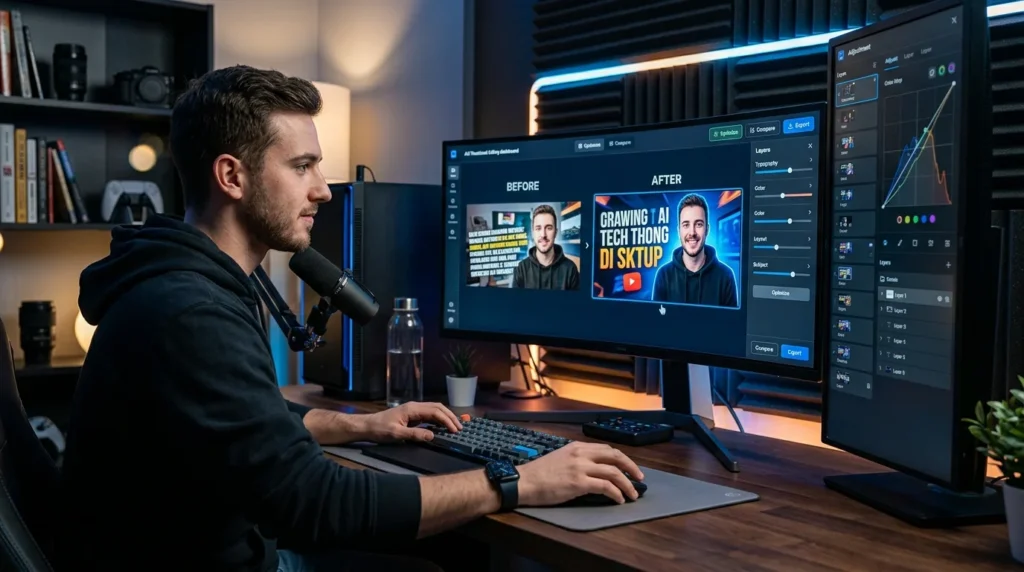
Thumbnail Editing helps content creators refine AI Thumbnails without starting from scratch. Using AI-powered editing tools, creators can adjust text placement, colors, contrast, layouts, focus points, and visual hierarchy to create thumbnails that attract more clicks, improve viewer engagement, and increase overall content performance.
Key Takeaways
- Thumbnail Editing improves AI Thumbnails with intelligent refinements.
- Edit text, colors, layouts, and focus points in minutes.
- Increase click-through rates without redesigning thumbnails.
- AI suggestions help improve visual hierarchy and readability.
- Create professional thumbnails faster with an optimized editing workflow.
Why Great Thumbnails Often Need Small Improvements
Creating a thumbnail is only the first step. Many thumbnails are already visually appealing but still fail to generate the number of clicks creators expect. In most cases, the design does not need to be completely rebuilt. Instead, it requires a few thoughtful refinements that improve clarity, balance, and visual impact.
- A headline may need to be slightly larger.
- The subject might require better positioning.
- Colors could use stronger contrast.
- The focal point may not immediately capture attention.
These small improvements often have a significant influence on how viewers respond to a thumbnail.
Instead of creating a completely new design, creators simply need an efficient way to perfect the one they already have.
Why Manual Thumbnail Editing Slows Content Creation
Traditional editing workflows require creators to open design software, locate editable files, make adjustments, export new versions, and compare results repeatedly.
For creators producing multiple videos every week, these repetitive tasks quickly become a bottleneck.
Common challenges include:
- Repositioning text manually
- Adjusting font sizes repeatedly
- Improving color contrast
- Correcting visual balance
- Exporting multiple versions
- Comparing edits individually
Although each task appears minor, together they consume valuable production time that could be spent creating new content.
Thumbnail Editing simplifies these refinements by allowing creators to improve existing AI Thumbnails quickly without rebuilding them.
What Is Thumbnail Editing?
Thumbnail Editing is an AI-powered feature that helps creators refine and optimize AI-generated thumbnails using intelligent editing tools.
Instead of recreating thumbnails from scratch, creators can make targeted improvements while preserving the original design.
The AI understands thumbnail design principles and helps improve:
- Text placement
- Font size
- Typography
- Color contrast
- Background clarity
- Subject positioning
- Visual hierarchy
- Overall balance
Every adjustment is designed to improve readability and viewer attention while maintaining a professional appearance.
Why Thumbnail Editing Improves Click-Through Rates
Successful thumbnails attract attention within seconds.
Small visual improvements often determine whether viewers choose to click or continue scrolling.
Thumbnail Editing improves click potential by enhancing the elements that influence viewer behavior most.
Benefits include:
- Better readability
- Stronger visual contrast
- Improved focus points
- Cleaner layouts
- More balanced compositions
- Better mobile visibility
Rather than guessing which edits matter, creators receive AI-assisted recommendations that make thumbnails easier to understand and more visually compelling.
Introducing the EDIT Framework™
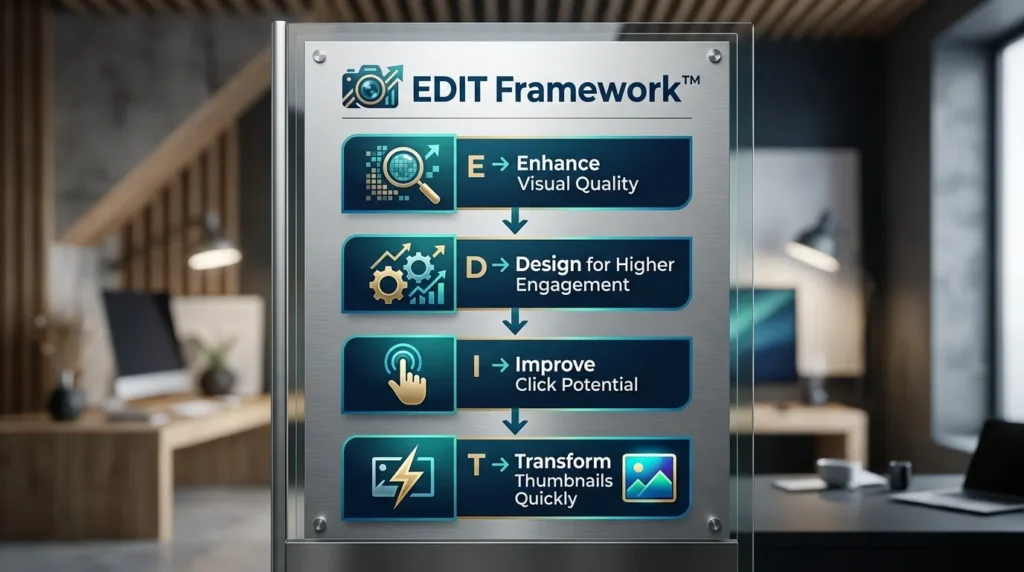
At LovPics, we believe refining a thumbnail should be faster than creating one from scratch. The EDIT Framework™ provides a structured approach to improving AI Thumbnails while maintaining design consistency and maximizing click potential.
E – Enhance Visual Quality
Improve the overall appearance of thumbnails by refining typography, spacing, contrast, colors, and image clarity without changing the original creative concept.
D – Design for Higher Engagement
Optimize visual hierarchy so viewers immediately understand the video’s subject and value before deciding whether to click.
I – Improve Click Potential
Apply intelligent AI recommendations that strengthen readability, focus points, and composition to encourage higher click-through rates.
T – Transform Thumbnails Quickly
Replace lengthy manual editing workflows with AI-powered refinements that deliver professional results in minutes.
How Thumbnail Editing Works
The editing process begins with an existing thumbnail. Creators upload a thumbnail or select one generated within the LovPics platform.
The AI analyzes the design by evaluating:
- Typography
- Layout
- Color balance
- Contrast
- Subject placement
- Visual hierarchy
- Overall composition
Based on this analysis, creators can make targeted improvements using intelligent editing tools.
Popular editing options include:
- Resize text
- Reposition headlines
- Improve spacing
- Increase contrast
- Refine colors
- Adjust focus areas
- Balance layouts
- Enhance readability
Each modification happens without rebuilding the thumbnail, allowing creators to preserve their original creative direction while improving overall performance.
Why AI Makes Thumbnail Refinement Smarter
Traditional editing depends entirely on manual decisions.
Creators often spend time experimenting with different layouts without knowing whether the changes will actually improve performance.
Thumbnail Editing introduces intelligence into this workflow.
Instead of making random adjustments, AI evaluates the thumbnail using proven visual design principles and suggests improvements that support stronger viewer engagement.
When combined with AI Performance Rating, creators gain even deeper insights into which refinements are most likely to improve click-through rates before publishing.
This data-driven workflow helps creators make faster, more confident editing decisions while reducing unnecessary trial and error.
Benefits for Different Types of Creators
Thumbnail Editing supports creators across many industries because every video depends on attracting attention before audiences decide to watch.
YouTube Creators
Quickly refine gaming videos, tutorials, vlogs, interviews, reviews, educational content, and entertainment thumbnails without rebuilding designs.
Digital Marketers
Optimize campaign thumbnails for advertisements, webinars, lead generation, and promotional videos while maintaining consistent branding.
Online Educators
Improve course thumbnails by enhancing readability and visual hierarchy, helping learners quickly understand the value of educational content.
Ecommerce Brands
Refine promotional thumbnails for product demonstrations, seasonal campaigns, launches, and marketplace videos to increase customer engagement.
Social Media Teams
Create polished thumbnails for YouTube, Facebook, Instagram, LinkedIn, X, and other platforms while maintaining consistent visual identity across every channel.
Continue Reading on AI Marketing Creatives
Real World Applications of Thumbnail Editing
Every creator wants more clicks, but very few thumbnails are perfect on the first attempt. Thumbnail Editing allows creators to make intelligent refinements that improve visual impact without redesigning the entire thumbnail, helping content perform better across multiple platforms.
Thumbnail Editing for YouTube Videos
YouTube creators constantly compete for viewer attention. Even small adjustments to a thumbnail can influence whether someone clicks or keeps scrolling.
Thumbnail Editing helps creators improve text placement, facial focus, colors, and visual hierarchy so videos attract more attention in search results, recommendations, and subscription feeds.
Thumbnail Editing for Educational Content
Online educators and course creators depend on clear communication.
A well-edited thumbnail makes course titles easier to read while highlighting the most important visual elements. Better clarity helps learners quickly understand the value of the content before clicking.
Thumbnail Editing for Product Reviews
Review videos often feature products that need to stand out immediately.
Thumbnail Editing allows creators to emphasize products, improve color contrast, enlarge important text, and create stronger focal points without affecting the overall design.
Thumbnail Editing for Ecommerce Marketing
Brands producing promotional videos can quickly refine thumbnails for product launches, seasonal campaigns, advertisements, and marketplace videos.
Instead of creating multiple new designs, marketing teams can edit existing thumbnails to improve consistency and strengthen campaign performance.
Social Media Campaigns
Different platforms require different visual approaches.
Thumbnail Editing allows creators to adjust thumbnails for YouTube, Facebook, Instagram, LinkedIn, X, and other platforms while maintaining consistent branding across every channel.
Why Small Changes Produce Big Results
Many creators assume better thumbnails require complete redesigns. In reality, small refinements often produce meaningful improvements.
Examples include:
- Moving text away from important visual elements
- Increasing font size for mobile users
- Improving color contrast
- Repositioning the subject
- Strengthening visual hierarchy
- Removing distracting elements
- Improving whitespace
These adjustments make thumbnails easier to understand within seconds, increasing the likelihood that viewers will click.
Rather than changing the creative concept, Thumbnail Editing improves how effectively the existing concept communicates.
Thumbnail Editing Across the LovPics Workflow
The real power of Thumbnail Editing comes from how naturally it integrates with the complete LovPics AI Thumbnail ecosystem.
Creators can generate thumbnails, evaluate performance, refine designs, and export final versions without switching between multiple design tools.
Thumbnail Editing works seamlessly with:
- AI Thumbnails
- Multiple Variants
- AI Performance Rating
- Multi-Language Thumbnails
- GIF Speed Control
- Reference-Based Banner Creation
- AI Banner Generator
- AI Media Manager
- Bulk Image Export
This connected workflow enables creators to move from initial thumbnail generation to final publication with greater speed, consistency, and confidence.
Common Mistakes Content Creators Make
Editing Too Much
Adding too many visual elements often makes thumbnails cluttered. Effective thumbnails communicate one clear message with strong visual hierarchy rather than overwhelming viewers with unnecessary information.
Ignoring Mobile Viewers
Most viewers discover videos on mobile devices. Small text, weak contrast, and crowded layouts often become difficult to understand on smaller screens.
Thumbnail Editing helps optimize readability for mobile-first audiences.
Changing Multiple Elements Simultaneously
Making too many adjustments at once makes it difficult to understand which change improved performance. Creators should refine one major design element at a time whenever possible.
Prioritizing Style Over Clarity
Creative designs are valuable, but clarity always comes first. A thumbnail should immediately communicate what viewers can expect from the video. Thumbnail Editing helps balance creativity with readability.
Skipping Performance Analysis
Editing without understanding performance often leads to unnecessary changes.
Combining Thumbnail Editing with AI Performance Rating helps creators focus on refinements that are most likely to improve click-through rates.
The Future of AI Thumbnail Optimization
Content creation is becoming increasingly competitive, making continuous optimization more important than ever.
Instead of designing thumbnails once and leaving them unchanged, creators are adopting workflows that encourage ongoing improvement based on AI insights and performance data.
Thumbnail Editing represents this shift by allowing creators to refine existing designs quickly instead of rebuilding them from scratch.
As artificial intelligence continues evolving, thumbnail optimization will become more predictive, helping creators identify stronger layouts, better typography, improved color combinations, and more engaging visual compositions before publishing.
The future belongs to creators who iterate faster, optimize continuously, and publish thumbnails with greater confidence.
Frequently Asked Questions
What is Thumbnail Editing?
Thumbnail Editing is an AI-powered feature that allows creators to improve AI Thumbnails by refining text placement, typography, colors, layouts, visual hierarchy, and focus points without redesigning the entire thumbnail.
What can I edit in AI Thumbnails?
You can edit text size, text placement, typography, colors, contrast, layouts, subject positioning, spacing, focus points, and overall visual balance while maintaining professional image quality.
Does Thumbnail Editing improve click-through rates?
Yes. Better readability, stronger visual hierarchy, improved contrast, and clearer focus points help thumbnails attract more attention, which can improve click-through rates.
Will editing reduce image quality?
No. Thumbnail Editing preserves image quality while applying intelligent refinements, ensuring exported thumbnails remain suitable for YouTube and other social media platforms.
Can I undo my edits?
Yes. Thumbnail Editing supports iterative editing, allowing creators to experiment with different refinements before selecting the final version.
Does Thumbnail Editing work with AI-generated thumbnails?
Yes. Thumbnail Editing is designed specifically for AI Thumbnails generated within LovPics, while also supporting existing thumbnail designs uploaded by creators.
Can I edit thumbnails for different platforms?
Yes. Thumbnail Editing supports thumbnails for YouTube, Facebook, Instagram, LinkedIn, X, ecommerce promotions, online courses, and other digital marketing platforms.
Why should I use LovPics for Thumbnail Editing?
LovPics combines Thumbnail Editing with AI Thumbnails, Multiple Variants, AI Performance Rating, Multi-Language Thumbnails, Bulk Image Export, and other AI-powered creative tools, enabling creators to generate, refine, optimize, and publish high-performing thumbnails from one platform.
Conclusion
Creating an effective thumbnail does not always require starting over. In many cases, thoughtful refinements are enough to transform a good design into one that captures attention and encourages more viewers to click.
Thumbnail Editing gives creators an intelligent way to improve AI Thumbnails by refining typography, colors, layouts, and visual hierarchy without disrupting the original design. Instead of spending valuable time rebuilding thumbnails, creators can make targeted improvements that increase readability, strengthen visual impact, and support higher click-through rates.
As video competition continues to grow, the ability to optimize thumbnails quickly will become an essential part of every successful content creation workflow. Thumbnail Editing helps creators publish stronger thumbnails, improve engagement, and maximize the performance of every video they produce.