Single-Point Smart Retouch: The Easy Way to Fix Images

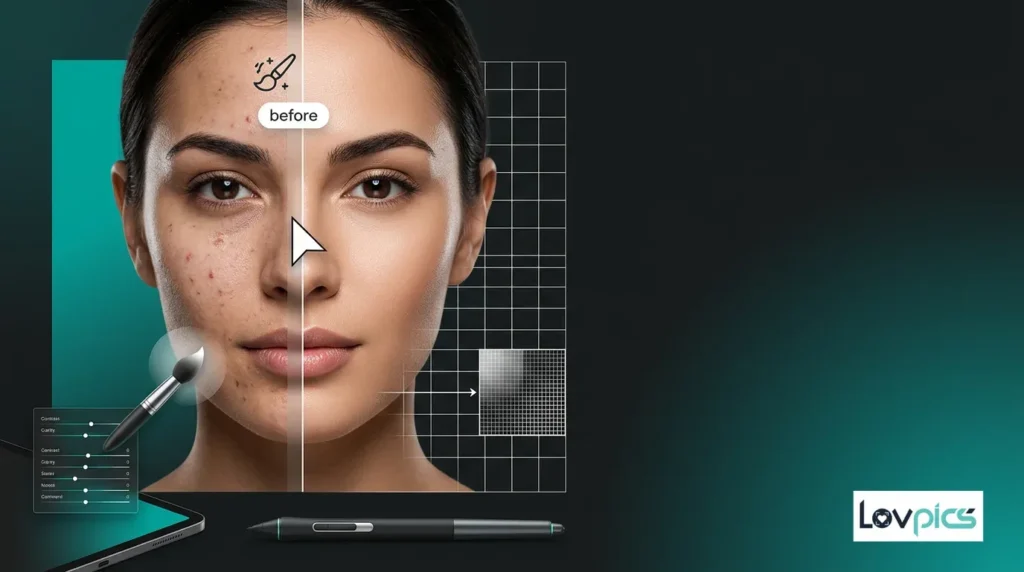
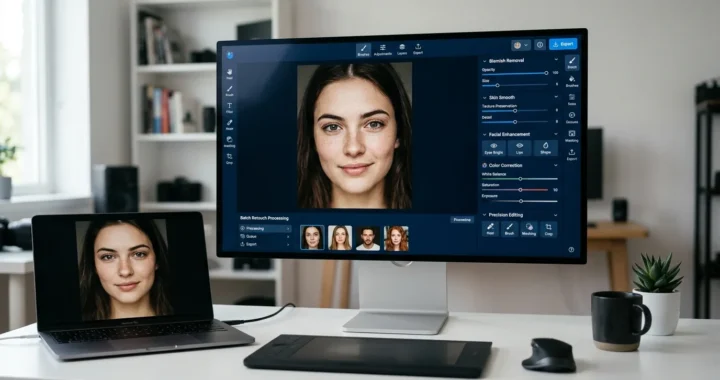
Single-Point Smart Retouch allows you to remove blemishes, scratches, unwanted objects, stray hairs, and small image imperfections with a single click. Instead of manually masking and editing images, AI intelligently understands the selected area and creates natural-looking corrections without affecting the rest of the image.
Key Takeaways
- Remove image imperfections with one click.
- Preserve natural textures and lighting.
- Eliminate unwanted objects without complex editing.
- Save hours of manual retouching.
- Create professional-quality images instantly.
Why Small Image Imperfections Matter
A single small imperfection can reduce the quality of an otherwise perfect image.
Whether you’re editing:
- Product photos
- Fashion photography
- Portraits
- Social media images
- Marketing creatives
- Ecommerce listings
Tiny distractions often stand out more than expected.
Examples include:
- Dust particles
- Scratches
- Stray hairs
- Skin blemishes
- Fabric wrinkles
- Background distractions
- Small unwanted objects
Although these imperfections are minor, removing them manually often takes much longer than expected.
The Challenges of Traditional Image Retouching
Professional retouching software is powerful, but it isn’t always efficient.
Most corrections require:
- Layer creation
- Brush tools
- Clone stamping
- Healing brushes
- Masking
- Manual blending
- Multiple revisions
Even experienced designers spend considerable time fixing small imperfections. For beginners, achieving natural-looking results can be even more challenging.
What Is Single-Point Smart Retouch?
Single-Point Smart Retouch is an AI-powered feature within LovPics AI Retouch that fixes image imperfections with a single click. Simply select the area you want to improve.
The AI automatically understands:
- Surrounding textures
- Lighting direction
- Image depth
- Color consistency
- Object boundaries
- Material properties
- Natural patterns
Instead of editing the entire image, the AI makes precise corrections only where needed.
Why Single-Point Smart Retouch Changes Image Editing
Artificial intelligence removes the complexity from professional retouching. Instead of spending several minutes or even hours editing tiny imperfections manually, creators can fix images almost instantly.
Key benefits include:
- Faster editing workflows
- Natural-looking corrections
- One-click operation
- Professional-quality results
- Better image consistency
- Lower editing effort
- Higher productivity
- Scalable content production
Whether editing one image or thousands, AI dramatically reduces production time.
Introducing the RETOUCH Framework™
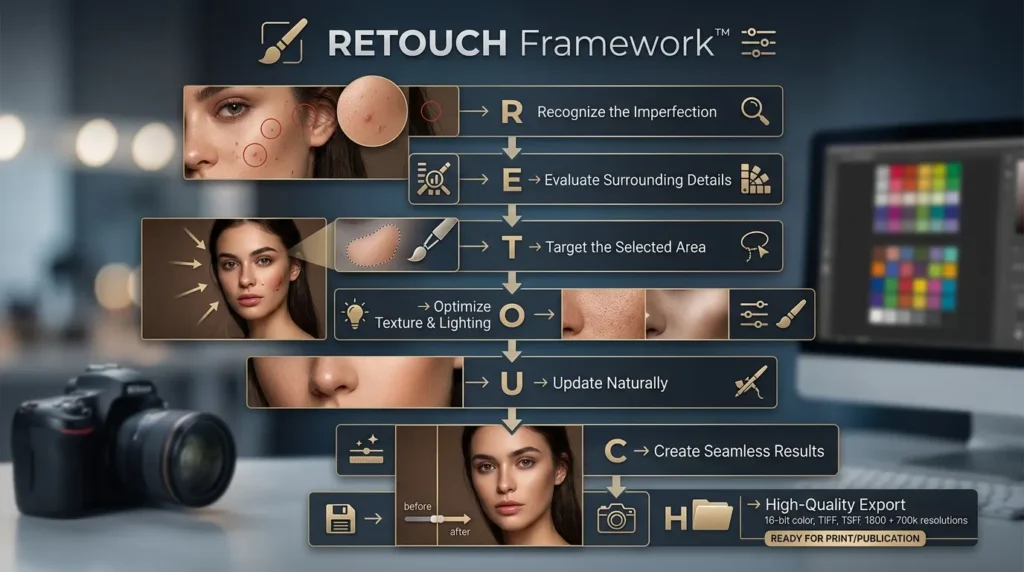
At LovPics, we believe great image editing should be simple, precise, and natural. The RETOUCH Framework™ helps creators achieve professional-quality corrections with minimal effort.
R – Recognize the Imperfection
Identify the blemish, scratch, object, or distraction that needs correction.
E – Evaluate Surrounding Details
AI analyzes textures, lighting, colors, and nearby image elements.
T – Target the Selected Area
Only the chosen area is modified, preserving the rest of the image.
O – Optimize Texture & Lighting
The AI recreates realistic textures, shadows, and highlights for a seamless appearance.
U – Update Naturally
Corrections blend perfectly into the surrounding image without obvious editing artifacts.
C – Create Seamless Results
Maintain the original realism while removing unwanted imperfections.
H – High-Quality Export
Download professionally retouched images ready for ecommerce, marketing, social media, or print.
Related LovPics AI Solutions
- AI Video Gen: Use property images as visual references and create motion-led video segments with custom instructions, multiple clips, different aspect ratios, music, subtitles, logos, and branded outros.
- AI Reels: AI Reels can support short-form social video workflows using concepts, storyboards, scripts, music, branding, and platform-oriented video content.
- AI Stories: For a property that needs a more narrative presentation, AI Stories can turn a narrative or script into scene-based video segments and combine them into a longer story.
- AI Banners: Property campaigns can extend beyond video into banner creatives using reference images, instructions, multiple styles, aspect ratios, and multilingual content.
- AI Posters: Property launches, open-house promotions, and campaign announcements can also be adapted into poster formats where appropriate.
- Multi-Frame 360 Generation: Where the available visual workflow is appropriate, multi-frame generation can help create rotating visual presentations. It should not be presented as a substitute for an accurate physical property tour unless the output has been carefully validated.
How Single-Point Smart Retouch Works
The process is remarkably simple.
- Upload your image into LovPics.
- Click on the area you want to fix.
Artificial intelligence immediately analyzes:
- Nearby textures
- Color gradients
- Lighting direction
- Image depth
- Surface materials
- Natural image patterns
Within seconds, the selected imperfection disappears while the surrounding area remains untouched.
The final result looks like the imperfection never existed.
Why AI Makes Professional Retouching Accessible
Traditional retouching requires technical expertise and expensive editing software. AI makes professional image correction accessible to everyone. Instead of learning advanced editing techniques, businesses, photographers, marketers, and ecommerce teams can achieve studio-quality results using simple one-click corrections.
As content production continues to accelerate, Single-Point Smart Retouch enables creators to edit faster, maintain image quality, and produce polished visuals without the complexity of traditional retouching workflows.
Read More Articles on AI Image Enhancement
Real-World Applications of Single-Point Smart Retouch
Every image doesn’t need a complete makeover. Most professional editing involves correcting small imperfections that distract from an otherwise perfect photo. Single-Point Smart Retouch enables photographers, ecommerce brands, marketers, and designers to make fast, precise corrections without affecting the rest of the image.
Ecommerce Product Photography
Product images directly influence purchasing decisions. Single-Point Smart Retouch helps ecommerce businesses remove:
- Dust particles
- Minor scratches
- Fabric wrinkles
- Packaging defects
- Reflections
- Small distractions
Without scheduling another product photoshoot.
Smart Retouch for Fashion Photography
Fashion images often require subtle refinements rather than extensive editing. AI helps photographers quickly remove:
- Stray hairs
- Clothing imperfections
- Makeup smudges
- Fabric lint
- Small accessories
- Background distractions
While preserving natural skin tones, lighting, and garment textures.
Smart Retouch for Portrait Photography
Portrait photographers spend considerable time removing small imperfections.
Single-Point Smart Retouch makes it easy to correct:
- Skin blemishes
- Temporary acne
- Flyaway hair
- Minor facial distractions
- Dust spots
- Background objects
Without creating an overly edited or artificial appearance.
Smart Retouch for Marketing Teams
Marketing creatives are frequently reused across multiple campaigns. Before publishing, designers can quickly remove:
- Unwanted logos
- Small design flaws
- Image distractions
- Product imperfections
- Background inconsistencies
Helping campaigns maintain a polished and professional appearance.
Smart Retouch for Creative Agencies
Agencies often edit hundreds of images every week. Single-Point Smart Retouch allows creative teams to perform quick corrections before client delivery, reducing editing time while maintaining consistent quality across large projects.
Single-Point Smart Retouch Across the LovPics Workflow
The real power of Single-Point Smart Retouch comes from its seamless integration with the LovPics AI editing ecosystem. Instead of functioning as a standalone correction tool, it becomes part of a complete AI-powered image editing workflow.
It integrates with:
- AI Retouch
- Precision Image Editing
- Smart Image Editing
- AI Product Photography
- AI Fashion Studio
- AI Photoshoot
- AI Media Manager
- AI Banners
- AI Posters
- Bulk Image Export
Together, these tools help creators produce professional-quality visuals with minimal editing effort.
Common Mistakes When Retouching Images
Editing Too Much
Many users attempt to improve an image by making broad edits. Excessive retouching often removes natural textures and creates unrealistic results. Single-Point Smart Retouch focuses only on the selected area, preserving the authenticity of the rest of the image.
Using Complex Editing Tools for Small Fixes
Professional editing software offers powerful features, but using layers, masks, and healing brushes for a tiny imperfection is often unnecessary. AI simplifies this process into a single click.
Repeating the Same Manual Process
Photographers frequently perform identical corrections across multiple images. AI dramatically reduces repetitive editing, allowing creators to spend more time on creative work.
Ignoring Small Imperfections
Tiny distractions can reduce the perceived quality of an otherwise excellent image. Removing small flaws improves professionalism and builds greater customer trust, especially for ecommerce and advertising visuals.
Replacing Instead of Correcting
Some creators replace entire backgrounds or heavily edit images when only a small correction is required. Single-Point Smart Retouch preserves the original image while fixing only the specific area that needs improvement.
The Future of AI-Powered Image Retouching
Artificial intelligence is transforming image editing from manual correction into intelligent enhancement.
Future innovations may include:
- Context-aware object removal
- AI-powered texture reconstruction
- Automatic distraction detection
- Intelligent portrait enhancement
- Product defect recognition
- One-click commercial image optimization
These capabilities will enable creators to produce professional-quality images faster while maintaining complete creative control.
Comparison Table
Traditional Retouching vs Single-Point Smart Retouch
| Feature | Traditional Retouching | Single-Point Smart Retouch |
|---|---|---|
| Editing Speed | Slow | Fast |
| Technical Skill Required | High | Low |
| One-Click Corrections | No | Yes |
| Natural Texture Preservation | Manual | AI Assisted |
| Localized Editing | Manual | Automatic |
| Workflow Complexity | High | Simple |
| Best For | Advanced Manual Editing | Everyday Professional Corrections |
Decision Matrix
Who Should Use Single-Point Smart Retouch?
| Business Type | Recommended |
|---|---|
| Ecommerce Brands | ⭐⭐⭐⭐⭐ |
| Fashion Brands | ⭐⭐⭐⭐⭐ |
| Product Photographers | ⭐⭐⭐⭐⭐ |
| Portrait Photographers | ⭐⭐⭐⭐⭐ |
| Creative Agencies | ⭐⭐⭐⭐⭐ |
| Marketing Teams | ⭐⭐⭐⭐ |
| Social Media Creators | ⭐⭐⭐⭐ |
| Small Businesses | ⭐⭐⭐⭐ |
Frequently Asked Questions
What is Single-Point Smart Retouch?
Single-Point Smart Retouch is an AI-powered image editing feature that removes blemishes, scratches, unwanted objects, stray hairs, and other small imperfections with a single click while preserving the rest of the image.
What types of imperfections can Smart Retouch fix?
It can correct skin blemishes, scratches, dust, stray hairs, fabric imperfections, unwanted objects, background distractions, reflections, and many other small defects without affecting nearby image areas.
Will the rest of my image change?
No. The AI modifies only the selected area while preserving surrounding textures, lighting, colors, and image details, ensuring natural-looking results.
Can I retouch multiple areas in one image?
Yes. You can apply Single-Point Smart Retouch to multiple areas within the same image, making as many corrections as needed while maintaining consistent quality.
Is it suitable for professional photography?
Absolutely. LovPics uses advanced AI to preserve realistic textures, lighting, and image quality, making it suitable for ecommerce photography, fashion campaigns, portraits, product catalogs, and commercial marketing materials.
Does it work with other LovPics editing tools?
Yes. Single-Point Smart Retouch integrates seamlessly with AI Retouch, Precision Image Editing, Smart Image Editing, AI Product Photography, AI Fashion Studio, AI Photoshoot, AI Media Manager, and Bulk Image Export.
Why should I use LovPics for image retouching?
LovPics combines Single-Point Smart Retouch, AI Retouch, Precision Image Editing, Smart Image Editing, AI Product Photography, AI Fashion Studio, AI Photoshoot, and Bulk Image Export into one intelligent editing platform. It enables creators to fix image imperfections instantly, maintain professional image quality, reduce editing time, and streamline high-volume content production.
Conclusion
Professional image editing doesn’t always require hours of work. In many cases, a single small imperfection is all that stands between a good image and a great one.
Single-Point Smart Retouch makes these corrections effortless. With AI-powered precision, creators can remove blemishes, scratches, stray hairs, unwanted objects, and other distractions with a single click while preserving natural textures, lighting, and realism.
As businesses continue producing larger volumes of visual content, tools like Single-Point Smart Retouch help photographers, ecommerce brands, marketers, and creative teams deliver polished, professional images faster, more efficiently, and with far less manual effort.