Lovpics MCP Server: AI-Powered Creative Workflow

Lovpics MCP Server brings AI-powered creative production closer to where businesses plan, create, and manage digital content. AI tools are increasingly part of how businesses generate ideas, write scripts, analyze information, build workflows, and automate repetitive tasks.
But one gap often remains. The idea may be created inside an AI workspace, while the actual creative production happens somewhere else.
You may ask an AI to create a product campaign, develop an advertisement concept, or prepare a social media idea. Then you may need to leave that workspace, open another creative platform, upload your assets, create the content, and bring the results back into your workflow.
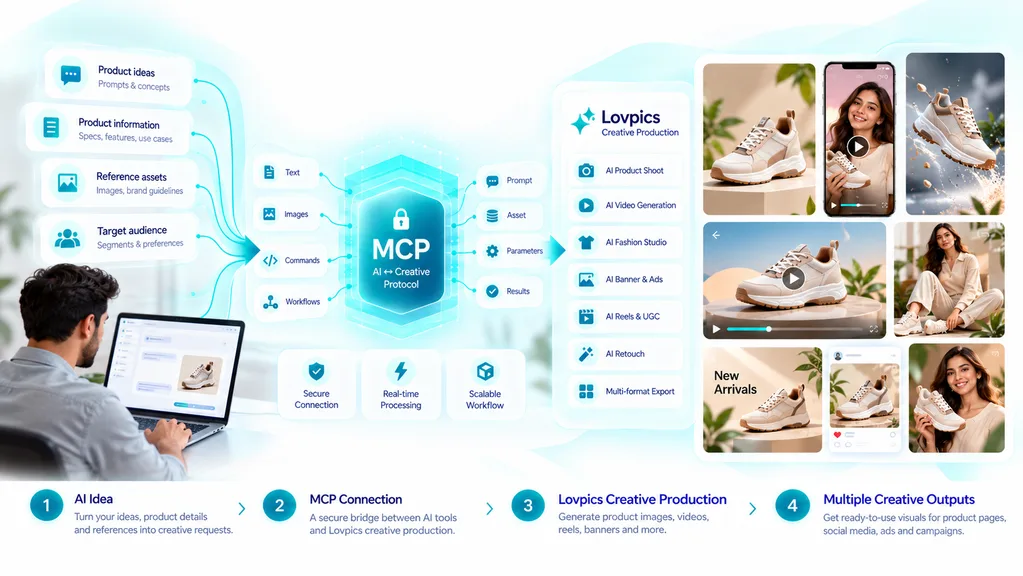
With Lovpics available as an MCP Server, compatible AI tools and workflows can connect directly with Lovpics’ creative capabilities.
Instead of moving between different tools for every step, you can bring creative production closer to where your ideas are created.
Imagine telling your AI: “Create a product ad for this product.“
The AI handles the idea and workflow, while Lovpics brings creative production into the process. This creates a new way to think about AI-powered creative workflows.
Your AI handles the idea. Lovpics brings the creative to life.
Why Connecting AI With Creative Production Matters
AI has already changed how businesses generate ideas and develop marketing content. Marketing teams can use AI to brainstorm campaigns, write product descriptions, develop advertising concepts, create scripts, plan social media content, and organize information. However, an idea is only the beginning of a campaign.
A marketing campaign still needs visual assets that communicate the idea to customers. A product launch may require product images, banners, videos, and social creatives, while a fashion campaign may require model visuals, lifestyle imagery, reels, and advertising assets. A social campaign may need several creative variations for different platforms and audiences.
This creates a gap between idea generation and creative production. The marketing team may have already developed the concept inside an AI workspace, but the visual execution still requires another workflow, another platform, and often several manual steps.
A traditional process can look like this: AI Idea → Copy → Creative Tool → Upload Assets → Create → Review → Export
Every additional handoff can introduce friction, especially when teams need to create many assets for multiple campaigns.
An MCP-based workflow can bring these capabilities closer together. Instead of treating AI as the place where ideas are created and creative tools as completely separate destinations, businesses can connect the two parts of the workflow.
The broader concept becomes: AI Idea → Lovpics Creative Production → Creative Output
The objective is not simply to reduce the number of clicks. It is to make creative production a more connected part of the AI workflow.
What Is the Lovpics MCP Server?
MCP stands for Model Context Protocol, a protocol designed to help compatible AI applications interact with external tools and capabilities. In practical terms, an MCP Server can make specific capabilities available to compatible AI tools so those tools can use them as part of a broader workflow.
For Lovpics, this means its creative capabilities can become part of compatible AI workflows rather than being treated only as a separate destination. Users can connect AI-driven instructions with creative production capabilities when their chosen AI environment supports MCP.
This can be useful for teams that already use AI for planning, writing, research, automation, and campaign development. Instead of stopping the workflow whenever a visual asset is needed, creative production can become part of the connected process.
The result is a more integrated workflow that moves closer to: Think → Instruct → Create → Review
rather than repeatedly moving between separate tools for each stage.
What Can You Create With Lovpics Through MCP?
Lovpics brings multiple creative capabilities into compatible AI workflows. This means the MCP workflow can support different types of marketing and visual production requirements rather than being limited to a single type of creative asset.
AI Product Images
Product images are an essential part of ecommerce and digital marketing. Lovpics can support product-focused visual creation so businesses can develop imagery for product pages, campaigns, social media and other marketing requirements.
When product image creation becomes part of a broader AI workflow, teams can move from a product requirement toward the visual asset without treating image production as an isolated activity.
UGC Videos and Reels
Short-form videos and UGC-style content are important formats for modern social media marketing. Lovpics can support the creation of UGC videos and reels that can be used for product promotion, social campaigns, and other marketing activities.
This allows an AI-driven campaign workflow to move beyond written ideas and incorporate short-form video production as part of the creative process.
Product Videos
Product videos can help businesses demonstrate products, communicate benefits, and create more engaging ecommerce content. Lovpics can bring product video creation into the broader creative workflow so product campaigns can include both static and video-based assets.
Motion Banners
Motion banners provide another way to communicate promotional messages and campaign ideas. Instead of limiting digital advertising to static visuals, businesses can use motion-based creative formats as part of their broader campaign production.
Social Media Creatives
Social media campaigns often require several visual assets, including posts, short videos, promotional creatives, and campaign variations. Lovpics can support these requirements while remaining connected to the larger AI-driven workflow.
Ad Campaigns
Advertising campaigns require more than a single image. Teams may need multiple creative directions, product visuals, videos, and variations designed around different messages or audiences.
With Lovpics connected to compatible AI workflows, creative production can become part of the campaign development process rather than a completely separate step.
Fashion and Lifestyle Visuals
Fashion brands often need product imagery, model visuals, lifestyle scenes, and campaign content. Lovpics can support these creative requirements, allowing fashion campaigns to incorporate visual production into an AI-powered workflow.
Editing and Enhancing Existing Creatives
Creative workflows do not always begin with a blank canvas. Businesses often have existing product images, campaign visuals, and marketing assets that need editing or enhancement.
Lovpics can also support workflows where existing creatives become inputs for further visual development rather than requiring teams to start from scratch.
How the Lovpics MCP Workflow Works
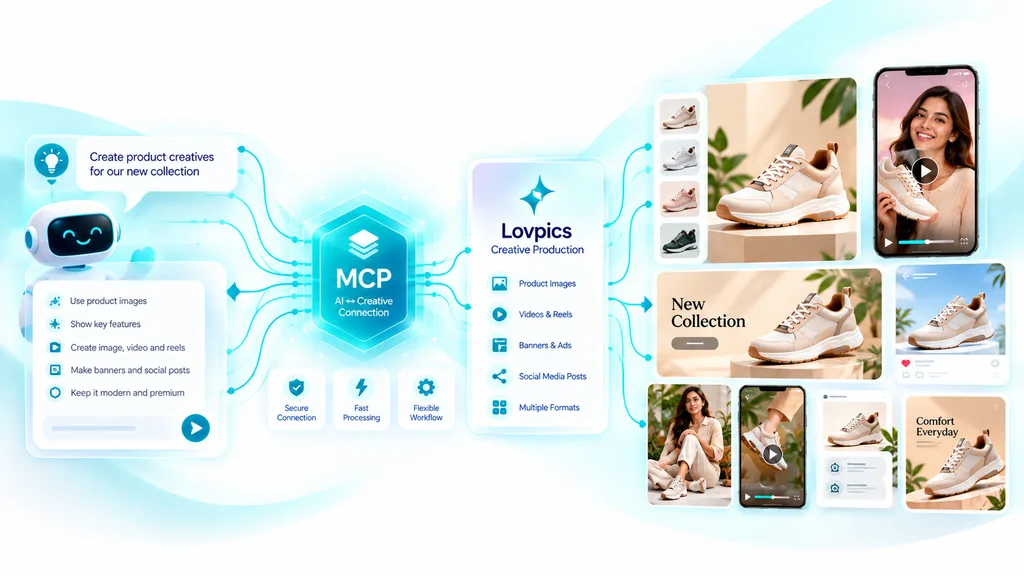
The concept behind the workflow is straightforward. An AI tool can help understand the user’s requirements, while Lovpics provides creative production capabilities that can be used within compatible workflows.
Start With an Idea
The process can begin with a natural-language instruction inside a compatible AI workspace. For example, a marketer could describe a new product campaign and explain the target audience, promotional objective and type of creative required.
Instead of beginning with a design tool, the team can begin with the business objective and let the AI workflow help structure the requirements.
Define the Creative Requirement
The next step is understanding what type of creative asset the campaign needs. Depending on the objective, this could be a product image, product video, UGC reel, social media creative, advertisement, motion banner, or fashion visual.
Clearly defining the required output helps connect the marketing objective with the appropriate creative production capability.
Bring Lovpics Into the Workflow
When Lovpics is available as an MCP Server within a compatible environment, its creative capabilities can become part of the connected workflow. This reduces the separation between the AI instruction and the creative production stage.
The workflow can therefore move from an instruction toward creative execution without treating every creative task as an entirely separate process.
Create the Creative
Lovpics handles the relevant creative production based on the workflow requirement. Depending on the task, this may involve product images, videos, reels, banners, fashion visuals, or editing and enhancement.
The exact process can depend on the AI environment, available capabilities, and requirements of the specific creative task.
Review and Refine
AI-assisted production still benefits from human review. Marketing teams should evaluate the generated creative for visual quality, product accuracy, branding, messaging, and suitability for the intended audience.
If adjustments are required, the workflow can be refined before the final creative is used in a campaign.
Continue the Workflow
Once the creative has been reviewed, it can become part of the next stage of the campaign workflow. This could involve preparing additional variations, creating supporting assets, or continuing with other marketing activities.
This is where connected workflows can become more valuable than isolated creative generation.
Related LovPics AI Solutions
- AI Video Gen: Use property images as visual references and create motion-led video segments with custom instructions, multiple clips, different aspect ratios, music, subtitles, logos, and branded outros.
- AI Reels: AI Reels can support short-form social video workflows using concepts, storyboards, scripts, music, branding, and platform-oriented video content.
- AI Stories: For a property that needs a more narrative presentation, AI Stories can turn a narrative or script into scene-based video segments and combine them into a longer story.
- AI Banners: Property campaigns can extend beyond video into banner creatives using reference images, instructions, multiple styles, aspect ratios, and multilingual content.
- AI Posters: Property launches, open-house promotions, and campaign announcements can also be adapted into poster formats where appropriate.
- Multi-Frame 360 Generation: Where the available visual workflow is appropriate, multi-frame generation can help create rotating visual presentations. It should not be presented as a substitute for an accurate physical property tour unless the output has been carefully validated.
From AI Prompt to Creative Output
One of the biggest opportunities created by connecting AI with creative production is reducing the distance between an instruction and a finished creative asset.
Consider a traditional workflow where a marketer begins with a simple requirement: “We need a product advertisement for our new skincare product.” The team may then need to develop the concept, write the copy, open a creative platform, upload product assets, create the visual, produce supporting videos, review everything, and export the final assets.
With an integrated AI workflow, the same campaign requirement can become part of a more connected process. The AI can help interpret the campaign objective while Lovpics provides the creative capabilities required to turn that requirement into visual content.
The value is not simply about fewer tool switches. It is about bringing creative production closer to the point where the idea is created.
Why This Matters for Marketing Teams
Marketing teams are under constant pressure to produce more content across more channels. A single campaign can require product images, social media creatives, reels, product videos, advertising assets, banners, and multiple creative variations.
At the same time, teams are increasingly using AI for campaign planning, copywriting, research, and content development. When creative production remains completely separate, the workflow still contains a significant gap between planning and execution.
Connecting AI workflows with creative production helps reduce this separation. Instead of using AI only for thinking and another platform only for creating, teams can bring both parts closer together.
This creates a more connected production process where AI supports the workflow, and Lovpics supports the visual execution.
AI Creative Workflows for E-commerce
E-commerce is one of the areas where connected creative workflows can become particularly useful. A new product launch may require several different visual assets, and each asset may traditionally involve a separate production step.
Imagine starting with a simple instruction: “Create a launch campaign for our new product.“
The campaign could then require product photography, a product video, social reels, advertising creatives, motion banners, and additional promotional assets.
Instead of treating each asset as an independent project, the team can think about the campaign as one connected creative workflow. The product information and campaign objective become the foundation for multiple visual outputs.
This can help teams create more consistent campaigns while reducing unnecessary separation between planning and production.
AI Creative Workflows for Fashion Brands
Fashion brands have particularly high visual content requirements because campaigns often involve products, models, lifestyle scenes, social content, and advertising creatives.
A collection launch may require product photography, model visuals, lifestyle imagery, reels, UGC-style videos, social creatives, banners, and advertising assets. Producing these assets separately can create additional coordination work for marketing and creative teams.
An AI-powered workflow can help structure the campaign around a central idea, while Lovpics can support the visual production requirements.
The broader workflow can move from: Collection Idea → Campaign Concept → Creative Production → Campaign Assets
This approach allows fashion teams to think about content as a connected campaign rather than a collection of unrelated design tasks.
AI Creative Workflows for Agencies
Agencies manage multiple clients, industries, and campaign requirements at the same time. A single client campaign can involve many creative formats, making workflow efficiency especially important.
An agency could structure a workflow around a client brief, use AI to help develop the campaign direction, and then connect creative production through Lovpics.
The workflow could look like: Client Brief → AI Campaign Planning → Creative Instructions → Lovpics Production → Review → Campaign Assets
This approach can help agencies bring ideation and production closer together while maintaining human review at important stages.
AI Creative Workflows for D2C Brands
D2C brands often operate with relatively lean marketing teams while still needing to produce content across multiple channels. Product launches, promotional campaigns, and social media activities can quickly create a large creative workload.
A connected workflow can help bring together product information, campaign ideas, marketing copy, product visuals, videos, reels, and advertising creatives.
The objective is not simply to produce more content. The objective is to make the content production process more connected, repeatable, and easier to manage.
AI + Lovpics for Product Campaigns
Consider a campaign instruction such as “Create a campaign for our new black running shoes targeting young fitness customers.” The campaign may require several different creative assets that support the same marketing objective.
A product-focused image could communicate the design and details of the shoe, while a lifestyle visual could show the product in a relevant context. A product video could demonstrate features, while a UGC-style reel could create a more social-first presentation.
Additional advertising creatives, social media assets, and motion banners could then extend the campaign across different channels.
The important concept is that the AI instruction describes the campaign objective, while Lovpics supports the creative execution required to bring that objective to life.
From One Idea to Multiple Creative Assets
An integrated workflow makes it easier to think in terms of campaigns rather than individual creative assets. A single campaign idea can become a product image, product video, UGC reel, social creative, advertisement, and motion banner.
This means teams can move from asking “How do I create this image?” to asking “What creative assets does this campaign need?“
That shift can help marketing teams plan their production more strategically. Instead of creating assets independently, they can identify the complete set of visuals needed to support a campaign objective.
The workflow then becomes: One Idea → Multiple Creative Assets → One Connected Campaign
Human Creativity Still Matters
Connecting AI with creative production does not eliminate the need for human decision-making. Marketing teams still need to determine what the campaign should communicate, who the target audience is, and which product benefits should receive attention.
Humans also need to evaluate whether the creative reflects the brand correctly and whether the final asset is suitable for the intended channel. AI can accelerate parts of the workflow, while Lovpics can support creative production, but human judgment remains important.
The strongest workflow is therefore not simply AI-generated content. It is a collaboration between AI assistance, creative production, and human review.
Common Challenges With AI Creative Workflows
Treating AI as the Entire Strategy
AI can help develop campaign ideas and organize information, but a successful creative workflow still needs a clear business objective. Teams should understand what they want the campaign to achieve before asking AI to produce a large number of assets.
Giving Vague Instructions
Creative output becomes easier to direct when the instruction contains useful context. Product details, target audience, campaign objective, desired format, and creative direction can all help create a more focused workflow.
Creating Content Without a Campaign Structure
Producing many individual assets does not automatically create a coherent campaign. Teams should begin with a campaign concept and determine which creative formats are needed to support the objective.
Skipping Creative Review
AI-assisted production should still include quality control. Product accuracy, brand consistency, visual quality, and marketing messaging should be reviewed before the final creative is published.
Ignoring Brand Guidelines
Multiple AI-generated assets can become visually inconsistent if there is no clear creative direction. Teams should maintain brand guidelines and apply consistent messaging, visual language, and campaign requirements across their content.
How Lovpics Fits Into the Modern AI Workflow
Traditional creative workflows often separate thinking from production. A marketer might use one tool for research, another for writing, another for campaign planning, another for design, and another for video production.
Every transition creates another handoff.
Modern AI workflows are increasingly moving toward connected systems where different capabilities can work together. Lovpics becoming available as an MCP Server brings creative production closer to compatible AI environments where teams are already developing ideas and workflows.
The broader concept can be summarized as: AI understands the task. Lovpics creates the visual. Humans review the result.
This creates a practical collaboration between AI-assisted workflow management, creative production, and human decision-making.
Lovpics MCP Server for Different Creative Needs
The Lovpics MCP workflow can support different types of creative requirements depending on the campaign and compatible AI environment.
| Creative Requirement | Lovpics Capability |
|---|---|
| Product imagery | AI Product Images |
| Short-form social video | UGC Videos & Reels |
| Product promotion | Product Videos |
| Dynamic advertising | Motion Banners |
| Social campaigns | Social Media Creatives |
| Advertising campaigns | Ad Campaign Creatives |
| Fashion campaigns | Fashion & Lifestyle Visuals |
| Existing creative improvement | Edit & Enhance |
| Multiple campaign assets | Connected Creative Workflow |
This allows teams to think about Lovpics not only as a standalone creative platform, but also as a production layer that can become part of broader AI-powered workflows.
Across the Lovpics Ecosystem
The MCP workflow becomes even more useful when it connects with the wider Lovpics ecosystem. Depending on the campaign, businesses can combine AI Product Photography, AI Fashion Photoshoot, AI Product Videos, AI Reels, AI Banners, AI 360° Views, AI Product Design, AI Retouching, AI Marketing Creatives and other visual production capabilities.
This makes it possible to build campaigns around connected creative requirements instead of treating every asset as an isolated production task.
For example, a product campaign could begin with product photography, continue into product video and reels, and then extend into banners and advertising creatives. Each asset serves the same broader campaign objective while being created through a connected production workflow.
Build Your Creative Workflow Around Ideas
The biggest shift is conceptual. Instead of starting with “Which creative tool should I open?“, teams can begin with “What do I want to create?“
That difference changes the workflow from a tool-first process into an objective-first process. The AI workspace can help describe and organize the requirement, while connected creative capabilities can help turn that requirement into visual assets.
The workflow can then become: Idea → Instruction → Creative Production → Review → Campaign
This makes the technology part of the workflow rather than another destination that teams have to visit every time they need a creative asset.
The Future of AI-Powered Creative Production
AI is moving beyond simple question-and-answer interactions. Modern AI workflows increasingly involve different tools and capabilities working together to complete larger tasks.
Creative production is an important part of this evolution because businesses do not only need answers. They need product images, videos, reels, advertisements, banners, fashion visuals, and campaign creatives.
By making creative capabilities available through an MCP Server, Lovpics brings visual production closer to the AI environments where teams are already developing ideas and workflows.
This can shorten the distance between “I have an idea” and “I have a creative.” More importantly, it creates an opportunity to build workflows where ideation, production, and review become connected parts of the same process.
Frequently Asked Questions
What is the Lovpics MCP Server?
The Lovpics MCP Server makes Lovpics’ creative capabilities available to compatible AI tools and workflows through MCP. This allows creative production to become part of connected AI workflows rather than remaining completely separate.
What does MCP mean?
MCP stands for Model Context Protocol. It provides a standardized way for compatible AI applications and external tools or capabilities to work together as part of a connected workflow.
Which AI tools can work with Lovpics through MCP?
Lovpics can work with compatible AI tools and workflows, including environments such as Claude, Cursor, and other MCP-compatible AI tools. The exact capabilities available can depend on the connected environment and workflow.
What can I create through the Lovpics MCP workflow?
The workflow can support creative production such as AI product images, UGC videos and reels, product videos, motion banners, social media creatives, advertising campaigns, fashion and lifestyle visuals, and editing or enhancing existing creatives.
Does Lovpics MCP replace the need for creative tools?
The purpose of the MCP integration is to make Lovpics creative capabilities available within compatible AI workflows. It is designed to bring creative production closer to the AI environment rather than requiring every task to be handled through disconnected workflows.
Can Lovpics MCP be used for ecommerce?
Yes. Ecommerce campaigns can combine product imagery, product videos, social creatives, advertising assets, and other visual content as part of an AI-powered creative workflow.
Can agencies use Lovpics MCP?
Yes. Agencies managing multiple clients and campaigns can use connected AI and creative workflows to bring campaign planning and visual production closer together while retaining human review.
Does MCP replace human creative decisions?
No. AI and connected creative tools can accelerate production, but humans still need to define campaign objectives, review creative outputs, and make final decisions about what should be published.
Is Lovpics MCP only for images?
No. The Lovpics MCP workflow can support multiple creative capabilities, including product images, videos, reels, banners, fashion and lifestyle visuals, and editing or enhancing existing creatives.
Conclusion
AI is changing how businesses develop ideas, plan campaigns, and create content. However, the real value of AI becomes greater when those ideas can connect with the tools needed to turn them into useful outputs.
With Lovpics available as an MCP Server, compatible AI tools and workflows can connect with Lovpics’ creative capabilities. This brings product images, UGC reels, product videos, motion banners, social creatives, advertising assets, and fashion visuals closer to the AI environments where ideas are created.
The goal is not simply to connect another tool to an AI workspace. It is to reduce the distance between ideation and creative production and create a more connected workflow for modern marketing teams.
Your AI can help you understand the idea. Lovpics can help bring that idea to life. Your team can review, refine, and decide what moves forward.
Your AI | Your Workflow | Lovpics Creative Power.